Coming soon
AI Resume Tools

Mira Scout vs Jobscan: Scanning a Resume vs Running the Whole Job Hunt

Mira Scout vs Jobscan explained: one scans your resume against a job, the other finds jobs and applies within your rules. See what each does and when.

Mira Resume Editorial Team · Career content team Published Updated 8 min read
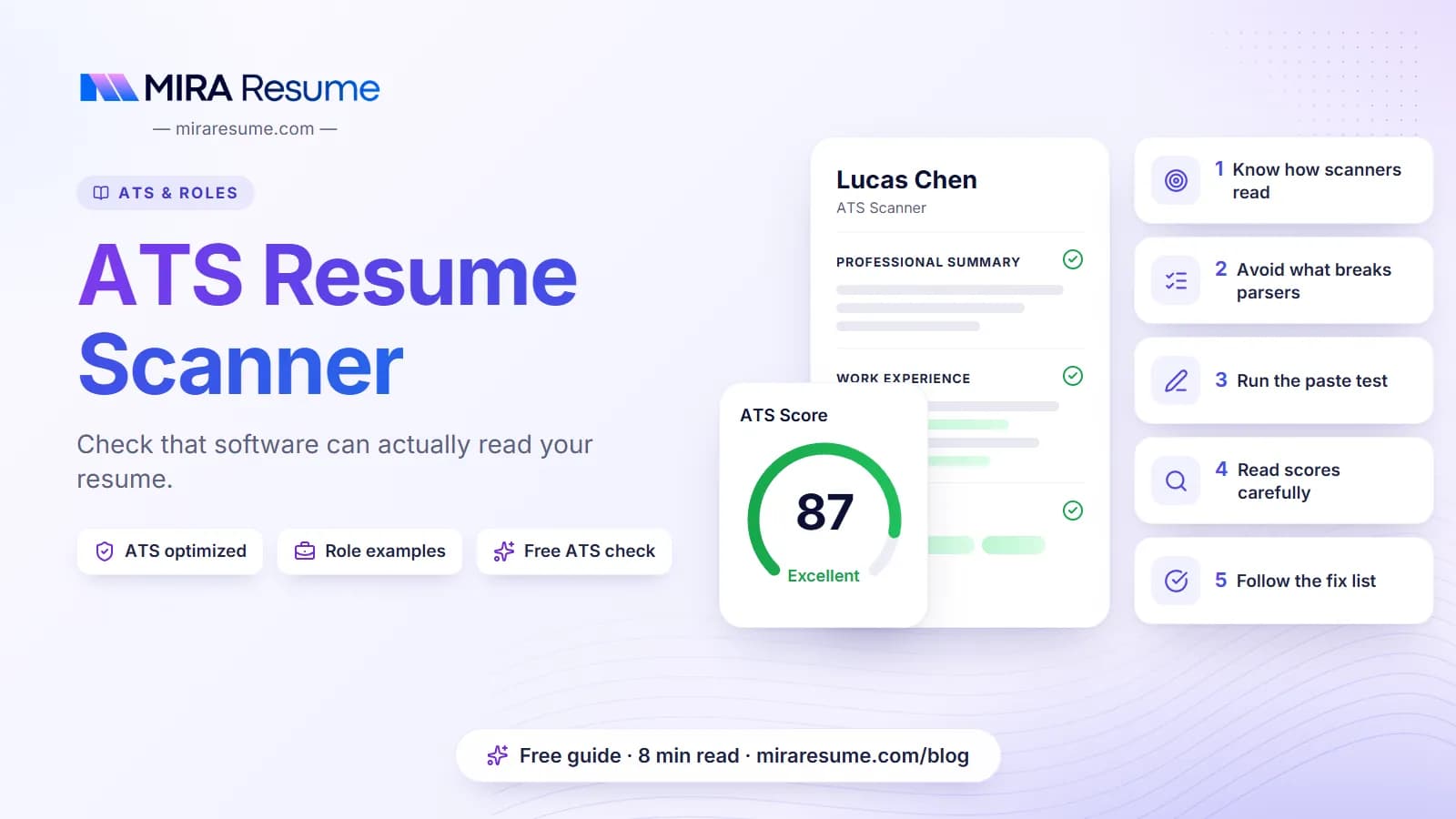
Mira Scout vs Jobscan: cover image for the Mira Resume guide, with an example resume and the 0 main points

Mira Scout vs Jobscan is really a question about which job you want software to do. Jobscan is well known for scanning a resume against one job posting and showing you what to change. Mira Scout, which is coming soon to Mira Resume for Pro and Elite members, is aimed at a different job: searching for roles, matching them to your resume and, if you switch it on, applying within limits you set.

This guide explains both in plain language, compares them side by side, and covers the real risks of automated applying so you can decide with your eyes open. The Mira Scout screens in the images below are illustrations with sample data, because the feature has not launched yet. Mira Scout was previously called AI Career Ops; only the name has changed, and the plans and rules described here are the same.
The short answer: scanning versus operating

Think of a job search as a pipeline with two very different kinds of work.

  • Resume work is about making one document match one job: the right keywords, a clean layout, honest bullet points. This is where a resume scanner helps.
  • Search work is the repetitive part: checking job boards, deciding which roles are worth your time, filling in applications and keeping track of what you sent. This is where an agent can save hours.

Jobscan focuses on the first kind. Mira Scout is designed around the second kind, while still using your resume as the source of truth. They solve different problems, so for many people the honest answer is that they are not direct substitutes.

What Jobscan does well

According to Jobscan's own site, its scanner scores a resume against a specific job listing and reports a match rate based on things like hard skills, job title, soft skills and other keywords. It also flags formatting problems and offers an optimizer where you accept or reject suggestions and watch the score update. Jobscan also describes a job tracker with a browser extension for saving jobs, a LinkedIn profile optimizer and a cover letter generator.

That is a strong toolkit if your main problem is "my resume does not seem to match the jobs I want." A match report gives you a concrete list of missing keywords and a number to improve. If you want the same kind of check inside Mira Resume today, the free ATS checker and our guide to the ATS resume scanner explain how scores like this are produced and what they can and cannot tell you.

Two cautions apply to any scanner. A match score is a guide, not a prediction of whether a recruiter will call you. And some free plans limit how many scans you get, so check the current plans on the vendor's own pricing page before you commit.

What Mira Scout is

Mira Scout is a new section of the Mira Resume dashboard for Pro and Elite members. It has two parts that work together.

  1. AI Job Search Agent and Job Finder. An always-on agent that searches job boards for you, ranks openings against your resume and surfaces the roles worth your attention.
  2. Jobs Applier. Automated job hunting: it can apply to jobs that match your resume while you sleep, with a resume and cover letter tailored to each role, and it logs everything in your Job Tracker.

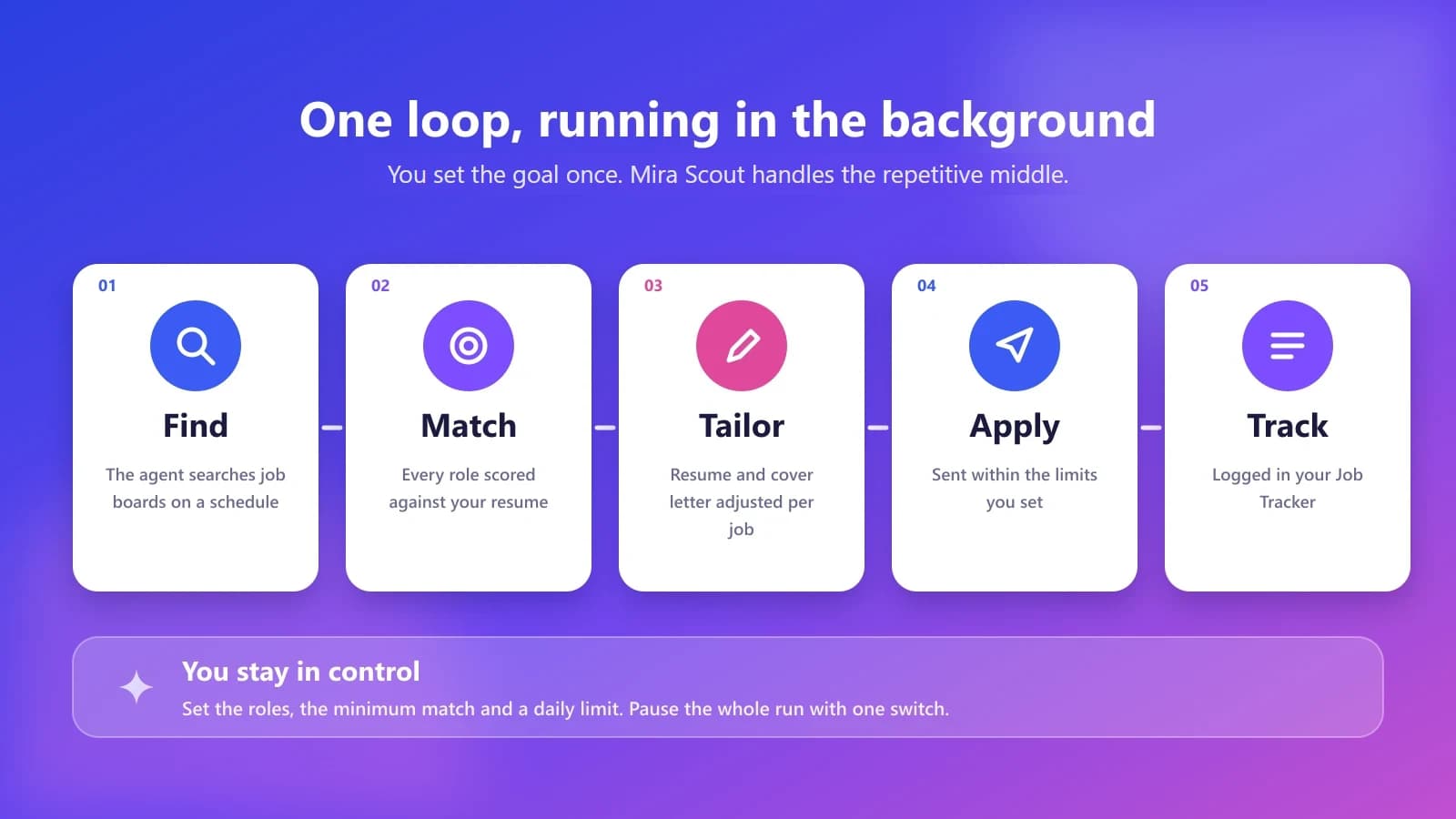
It is launching soon, and the dashboard shows a countdown. Features may change before launch, so treat this article as a preview of the plan rather than a finished product tour. The diagram below shows the loop it is built around.

The Mira Scout loop in five steps: find, match, tailor, apply and track
Illustration: the Mira Scout loop. You set the goal once, and the repetitive middle runs in the background.

The AI job search agent and job finder in detail

Most people do not struggle to find a job posting. They struggle to find the right ones quickly, check each against their experience, and not miss new listings. The job finder is designed to take that on.

What it is designed to do

  • Scan job boards on a schedule instead of waiting for you to open them.
  • Score every role against your chosen resume, so the best fits rise to the top.
  • Respect your filters: role, location, salary range and work type such as remote, hybrid or on-site.
  • Give you a short daily shortlist rather than an endless feed.

Why the match score matters

Matching works best when your resume already speaks the language of the jobs you want. Before you rely on any matcher, tidy your keywords using our guide to resume keywords and check how screening tools read your file in how an ATS works. A strong resume gives an agent better material to work with.

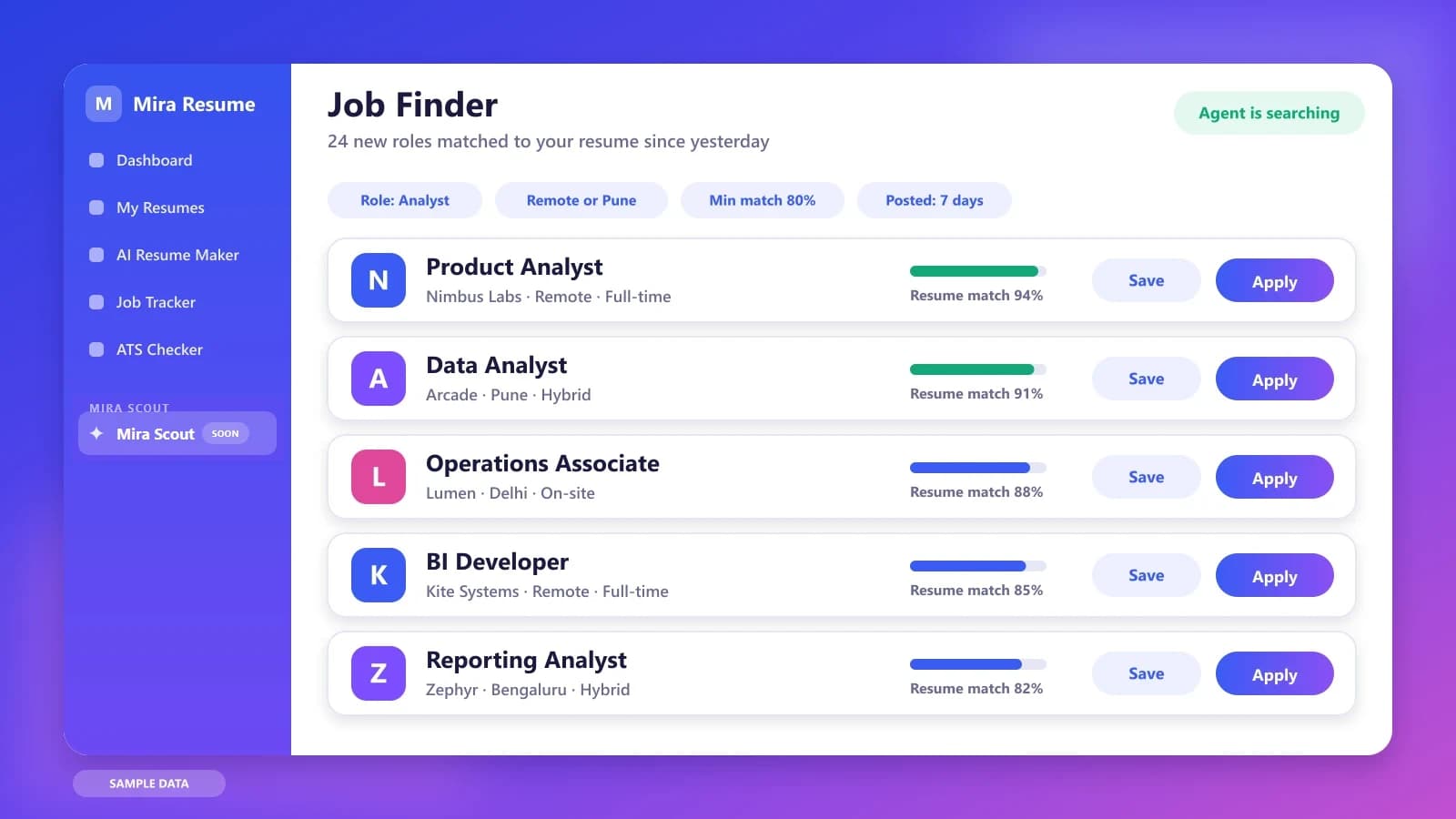
Illustration of the Mira Scout job finder listing roles that match your resume with a match percentage for each
Illustration with sample data: the Job Finder ranks new roles by how well they fit your resume.

Jobs Applier: auto-apply while you sleep, within your rules

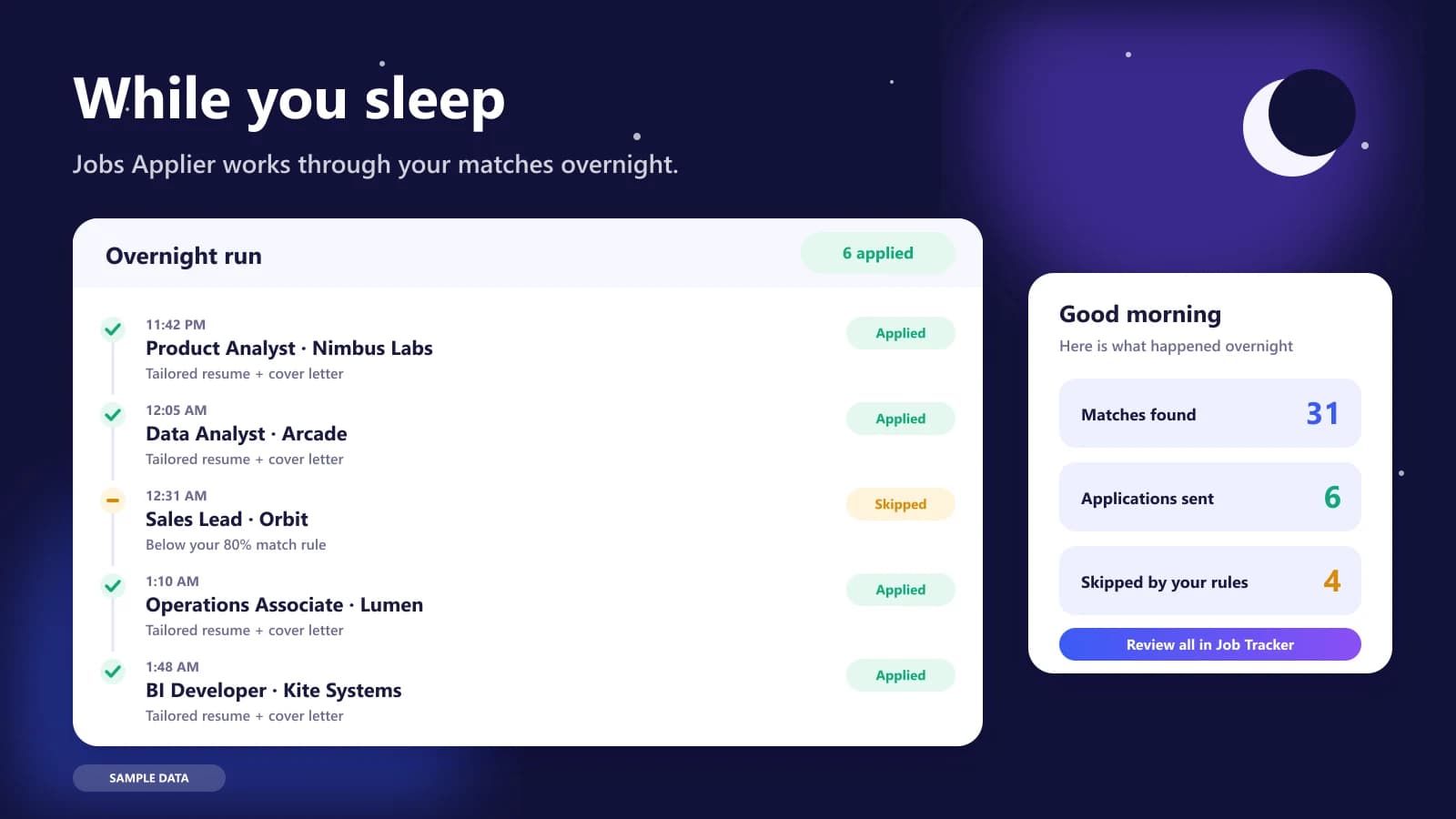
The Jobs Applier is the part that changes how a job search feels. Instead of filling in the same forms every evening, you set the rules once and let it work through matching roles overnight. In the morning you see a summary of what it found, what it sent and what it skipped.

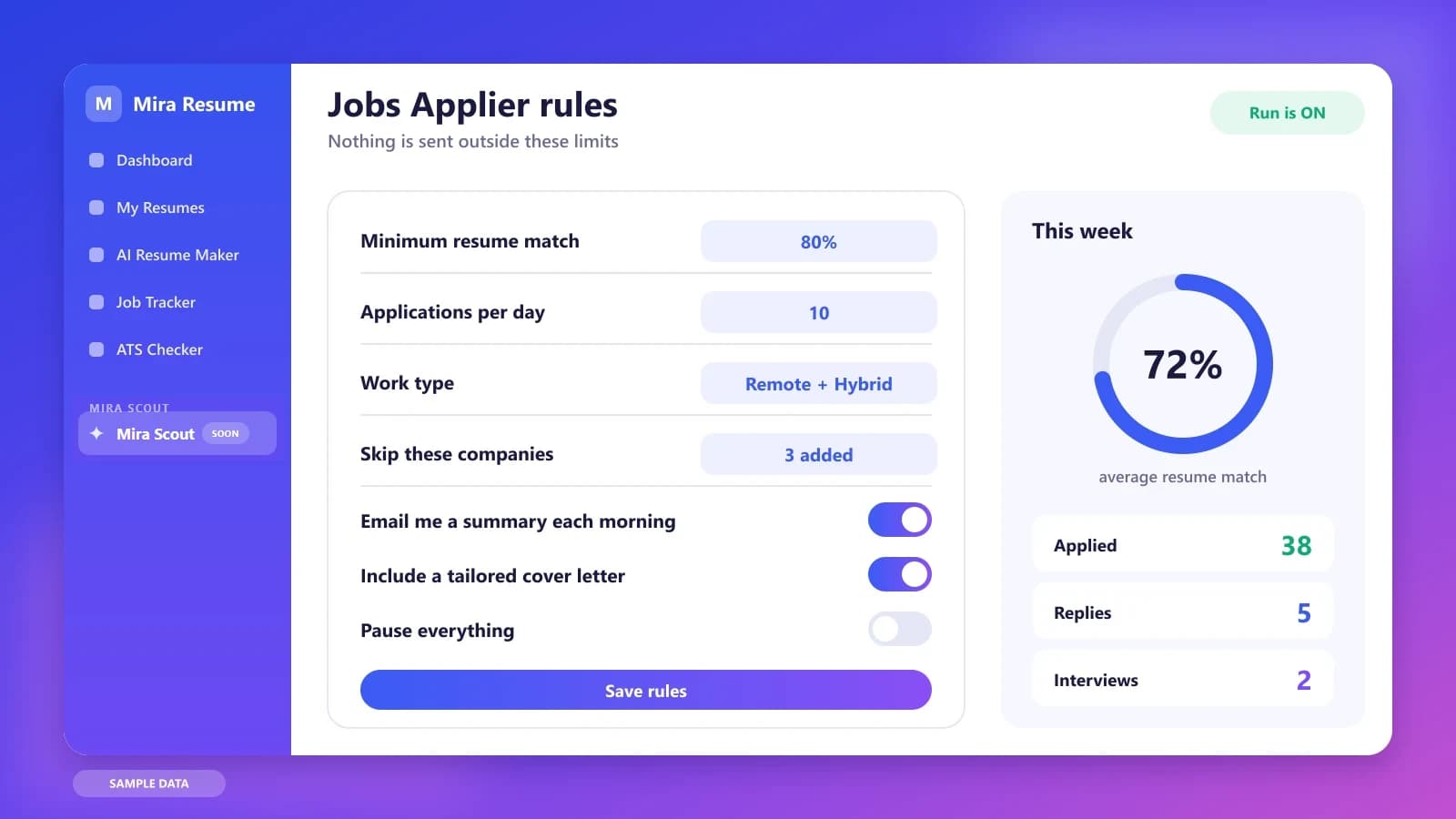
The rules you stay in charge of

  • Minimum match. Only roles above a resume-match level you choose are eligible.
  • Daily limit. A cap on how many applications can go out each day.
  • Work type and location. Remote, hybrid, on-site, and the cities you will consider.
  • Companies to skip. Employers you never want to apply to.
  • A pause switch. One toggle that stops everything.

Each application is meant to use a resume and cover letter tailored to the role, and each one is recorded in your Job Tracker so you can follow up. Following up matters: see how to follow up on a job application for timing and wording.

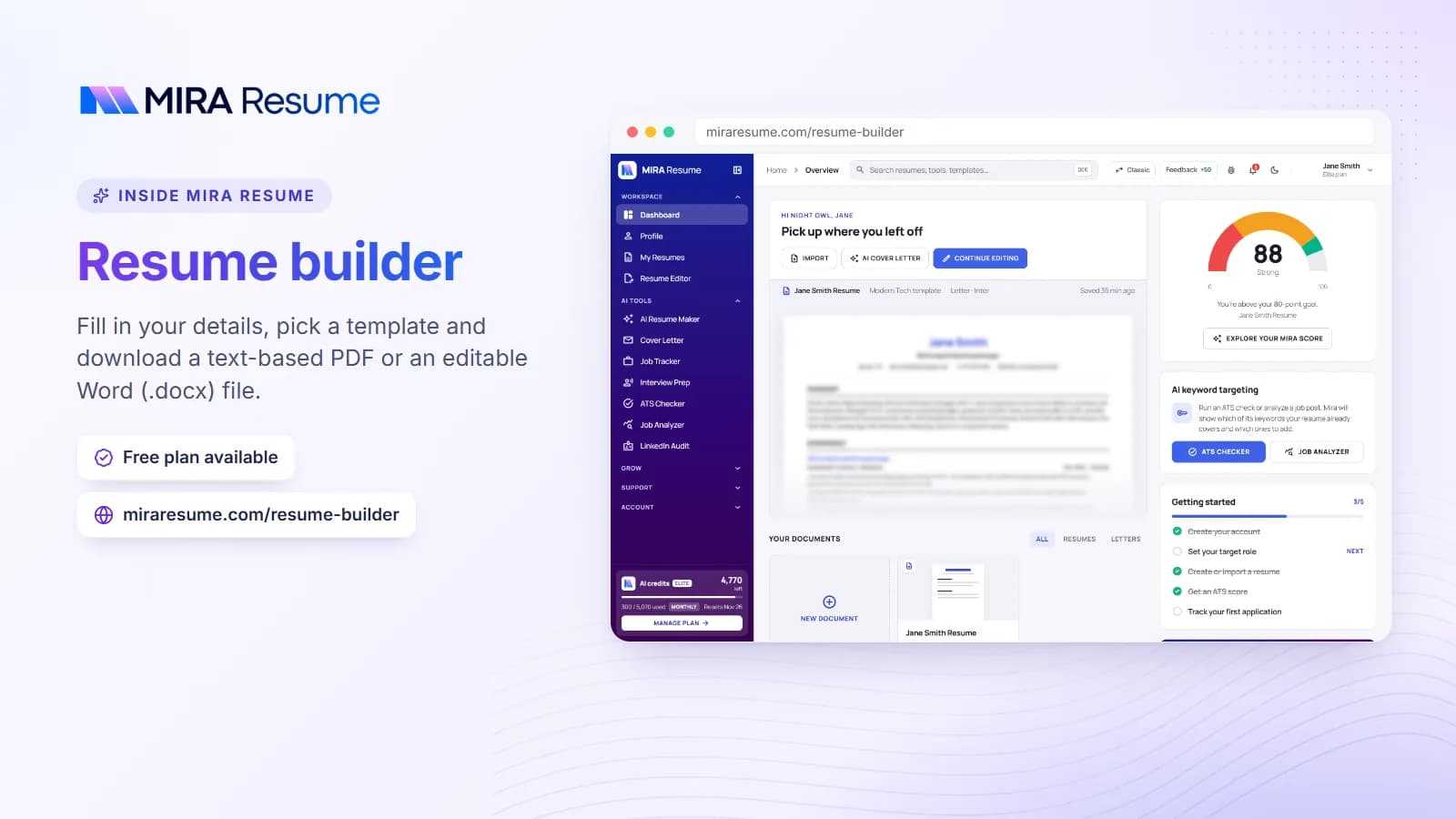
Screenshot of the Mira Resume resume builder (Fill in your details, pick a template and download a text-based PDF or an editable Word (.docx) file.)
Screenshot: Resume builder: Fill in your details, pick a template and download a text-based PDF or an editable Word (.docx) file.Try it
Illustration of the Jobs Applier overnight run: a timeline of tailored applications sent and a morning summary
Illustration with sample data: an overnight run, with a morning summary of what was sent and what was skipped.
Illustration of the Jobs Applier rules screen: minimum match, daily limit, work type, pause switch and weekly stats
Illustration with sample data: the rules that decide what the applier is allowed to do.

Mira Scout vs Jobscan: side-by-side comparison

This table describes what each tool is designed for. Jobscan details come from Jobscan's own published pages and may change, so check them directly. Mira Scout details describe our plan and may change before launch.

QuestionJobscanMira Scout (coming soon)
Main jobScan a resume against a job posting and improve itFind matching jobs and run the search for you
Starting pointYou bring a job descriptionYou bring a resume and your preferences
Core outputMatch rate, keyword gaps, formatting flagsRanked job matches and a log of applications
Job discoveryYou find the jobs, then scan against themAn agent searches job boards on a schedule
ApplyingYou apply yourselfOptional auto-apply within your rules
TrackingJob tracker with a browser extensionApplications logged in the Mira Job Tracker
Who controls the limitsYou, manually, on every applicationYou, through rules, daily limits and a pause switch
AvailabilityAvailable now, with free and paid plansPro and Elite members, launching soon

The two are also not mutually exclusive. If you like a dedicated match report today, use it, and keep an eye on Mira Scout for the search and applying side.

The honest risks of auto-applying

Automation is only useful if it protects the quality of what you send. Before you turn on any auto-apply feature, keep these points in mind.

  • Volume is not the goal. Ten well-matched applications usually beat a hundred random ones. A minimum-match rule and a daily limit exist for this reason.
  • Your resume must be truthful. Tailoring should rearrange and emphasize real experience, never invent it. Review what the tool produces and edit anything that is not accurate.
  • Some employers and job boards restrict automation. Their terms vary, so understand the rules of the sites you use and apply by hand where automation is not allowed.
  • Screening is increasingly automated on the employer side too. Read how AI resume screening works to see why clean formatting and honest keywords matter more than ever.
  • Applications are not interviews. Replies still depend on your experience, your resume and the market. No tool can promise offers or interviews.

Used carefully, an applier removes repetitive work. Used carelessly, it can send weak applications at scale. The controls are there so you can choose the first outcome.

Which one should you use?

Use the situation, not the brand, to decide.

  • You have a specific job and want to tailor your resume to it. A resume scanner is the right tool. Run a scan, fix the gaps, and apply by hand.
  • You are applying to many roles and the repetitive work is wearing you down. Mira Scout is built for this, once it launches.
  • You are not sure your resume is any good yet. Start with the basics: a single-column layout, standard headings and real, measurable bullets. Our free ATS checker is a good first step.
  • You want both. Many people will scan a priority job by hand and let an agent handle the long tail of lower-priority matches.

More Mira Scout comparisons

Jobscan is one of several kinds of tool people mention alongside Mira Scout. For the full picture, start with Mira Scout: the complete guide, then read the comparison that matches how you search:

How to get ready for the Mira Scout launch

  1. Finish your master resume. The agent can only match what your resume says. Fill gaps, add measurable results and remove anything you cannot back up.
  2. Run an ATS check. Fix formatting problems and missing keywords now, using the ATS checker.
  3. Decide your rules. Write down the roles, locations, salary floor and companies to avoid, plus the daily number of applications you are comfortable with.
  4. Check your plan. Mira Scout is for Pro and Elite members. Compare plans on the pricing page if you are on Free.
  5. Open the V2 dashboard. The Mira Scout section is already visible there, with the launch countdown.

When it launches, start small: a low daily limit, a high match threshold and a review of the first results before you raise the numbers.

Frequently asked questions

Is Mira Scout a Jobscan alternative?

Not exactly. Jobscan is mainly a resume scanner that compares your resume with a job posting. Mira Scout is aimed at finding jobs and, if you enable it, applying within your rules. For resume scanning today, Mira Resume has a free ATS checker. They solve different problems, and some people will use both.

When does Mira Scout launch, and who gets it?

It is coming soon, and the V2 dashboard shows a countdown to launch. It will be available to Pro and Elite members. Free users can see a preview and upgrade at any time. Details may change before launch, so check the dashboard section for the latest information.

Will the Jobs Applier send applications without my approval?

You decide how much control to keep. The plan is for you to set rules such as a minimum resume match, a daily limit, work type and companies to skip, with a pause switch to stop everything. Start with strict limits, review early results, and loosen them only if the applications look right.

Does auto-applying guarantee interviews?

No. Sending applications does not guarantee replies. Results depend on your experience, your resume, the roles and the job market. Tools like this save time on repetitive work, but quality still matters most, which is why a match threshold and a daily limit are built into the plan.

Is it safe to auto-apply to jobs?

It can be, if you stay in control. Keep your resume truthful, review what is sent, and follow the rules of each job board or employer, since some restrict automated applications. Use low daily limits at first, and apply manually anywhere automation is not allowed.

Where can I see how Jobscan works and what it costs?

Use Jobscan's own website for current features and pricing, because plans change. This article describes Jobscan only at a high level, based on its published pages. Mira Resume is not affiliated with Jobscan, and we recommend checking any vendor's latest details before you decide.

Found this useful? Share it

Send it to a friend who is job hunting, or save it for later.

Read this guide with AI

Get a plain-language summary and help applying it to your own resume. Pick an assistant; it opens with this article and a ready prompt.

Back to AI Resume Tools hub

All articles