Coming soon
AI Resume Tools

Mira Scout vs Teal: Which One Fits Your Job Search?

Mira Scout vs Teal compared: Teal bundles a resume builder, job tracker and match scorer, while Mira Scout finds jobs and can apply within your rules.

Mira Resume Editorial Team · Career content team Published Updated 8 min read
Mira Scout vs Teal: cover image for the Mira Resume guide, with an example resume and the 0 main points

Mira Scout vs Teal is a question about what you want software to do for you. Teal is generally described as an all-in-one job search workspace: a resume builder, a job tracker, a Chrome extension and a resume-to-job match score. Mira Scout, coming soon to Mira Resume Pro and Elite, adds an agent that finds roles and can apply within rules you set.

Both tools try to make a job search feel organised. They differ in how much of the legwork they take off your plate once the organising is done. This guide compares them side by side, explains where each fits, and covers the trade-offs honestly. Mira Resume is not affiliated with Teal. The Mira Scout screens shown below are illustrations with sample data, because the feature has not launched yet. Mira Scout was previously called AI Career Ops; only the name has changed, and the plans and rules described here are the same.
The short answer

Teal is a workspace you drive: you save jobs, tailor a resume to each one and move cards across a board. Mira Scout is designed so an agent does part of that driving for you. It searches for roles, scores them against your resume and, if you choose, applies within a daily limit.

If you enjoy hands-on control and want one tidy place to build and track, Teal-style tools fit well. If your bottleneck is the sheer volume of searching and form-filling, Mira Scout is aimed at that gap. Many people will find the two complement each other rather than compete.

What Teal is

Teal describes itself as a career platform. Third-party reviews and its own pages point to a handful of core pieces: an AI-assisted resume builder, a Kanban-style job tracker where each saved job can hold notes, contacts and the resume version you used, a Chrome extension that saves postings from job boards and company career pages, and a match score that compares your resume with a job description.

The common thread is that you stay in the driver's seat. You find the posting, you save it, you tailor the resume and you submit the application yourself. Reviews generally note that Teal does not submit applications on your behalf.

What Teal does well

A workspace like this solves a real problem: job searches create a mess of links, documents and follow-ups. Teal-style tools are good at:

  • Keeping everything in one board. Saved jobs, status, notes and contacts sit together instead of in tabs and spreadsheets.
  • Tailoring one resume per job. A match score shows which keywords a posting uses that your resume does not.
  • Capturing jobs as you browse. A browser extension turns a posting into a card in a click.
  • Staying free to start. Reviews describe a usable free tier, with more AI features on a paid plan. Check Teal's own pricing page for the current limits.

Where Mira Scout is different

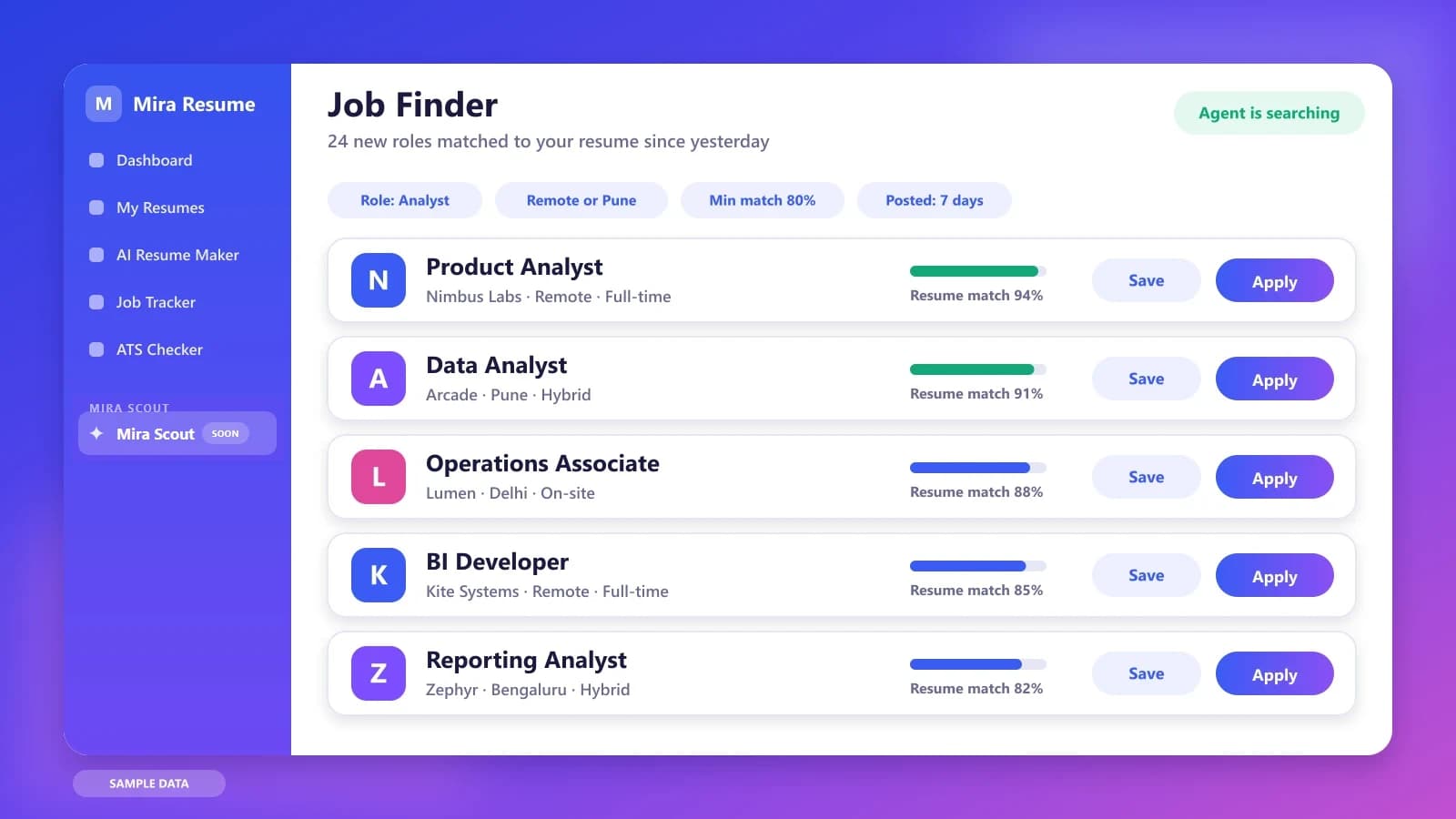
Mira Scout starts from a different question: what if the search itself ran in the background? It has two parts. The AI Job Search Agent and Job Finder scans job boards on a schedule and ranks roles against your resume. The Jobs Applier can apply to roles that clear your rules, with a resume and cover letter tailored to each, and logs every application in the Mira Job Tracker.

So the difference is not "builder versus tracker". It is who does the repetitive work. With a workspace, you do it faster. With an agent, you set the rules and review the results. You can still tailor a resume by hand in Mira's editor whenever a role deserves extra attention.

Illustration of the Mira Scout job finder listing roles that match your resume with a match percentage for each
Illustration with sample data: the Job Finder ranks new roles by how well they fit your resume.

Mira Scout vs Teal: side-by-side comparison

This table describes what each tool is designed for. Teal details come from its own published pages and third-party reviews, and may have changed, so check its website directly. Mira Scout details describe our plan and may change before launch.

QuestionTealMira Scout (coming soon)
Main jobBuild resumes, track jobs, score a matchFind matching jobs and run the search
Who finds the jobsYou, then you save themAn agent searches job boards on a schedule
Resume tailoringYou tailor per job with a match scoreTailored per application, within your rules
ApplyingYou submit each applicationOptional auto-apply with limits and a pause switch
TrackingKanban board with notes and contactsApplications logged in the Mira Job Tracker
ControlManual, at every stepRules: minimum match, daily limit, companies to skip
AvailabilityAvailable nowPro and Elite members, launching soon

Match scores: what they can and cannot tell you

Both Teal and Mira Scout lean on a match score, so it is worth knowing what one means. A match score compares the words and skills in your resume with a job description. It is useful for spotting missing keywords. It cannot tell you how a recruiter will judge your experience, and it does not predict an interview.

That is why the quality of your resume matters more than the tool. Read our guide to resume keywords to learn how to find the right terms in a posting, and use the free ATS checker to catch formatting problems that hurt parsing. A better source resume improves every match score, whichever tool you use.

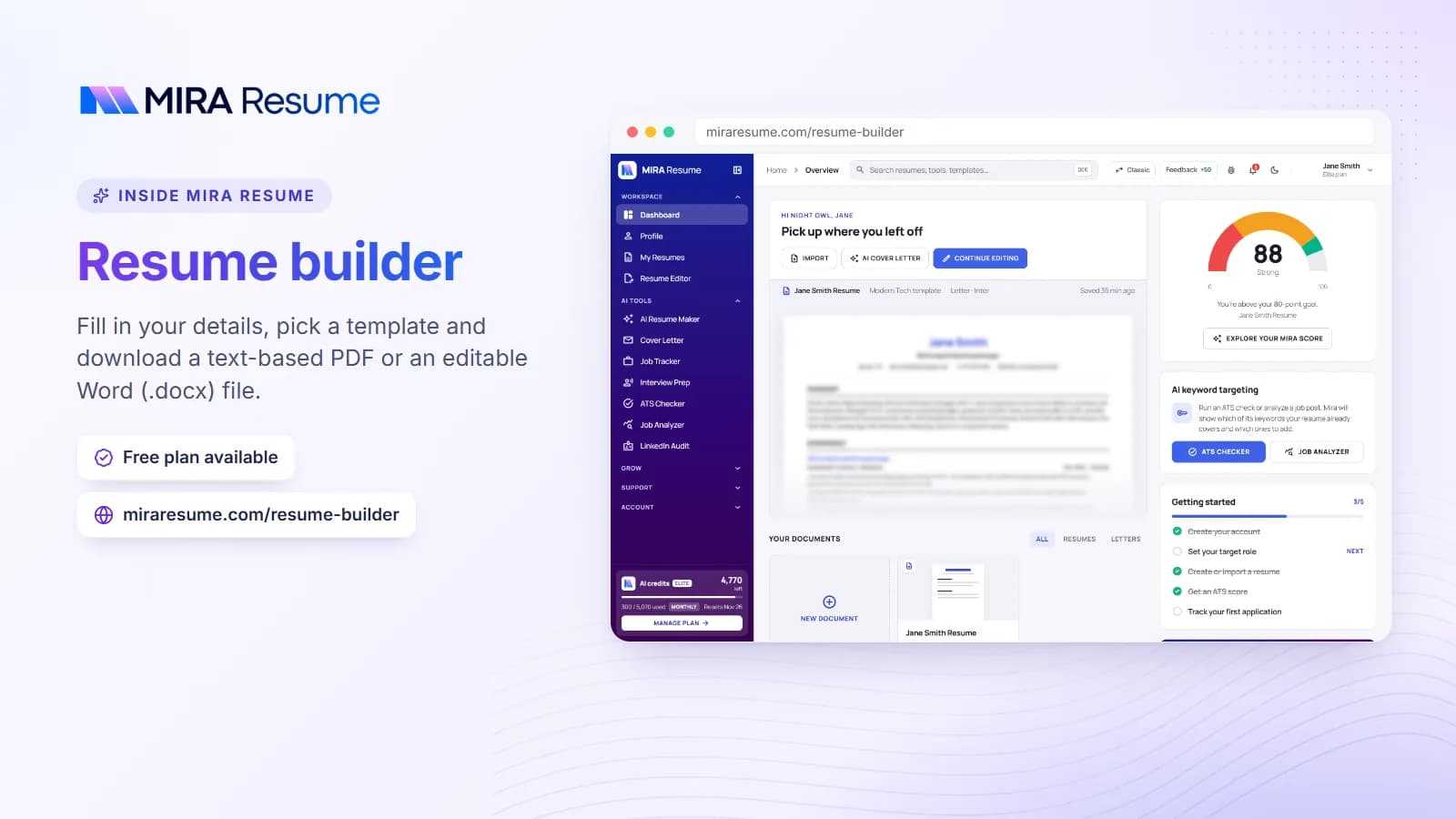
Screenshot of the Mira Resume resume builder (Fill in your details, pick a template and download a text-based PDF or an editable Word (.docx) file.)
Screenshot: Resume builder: Fill in your details, pick a template and download a text-based PDF or an editable Word (.docx) file.Try it
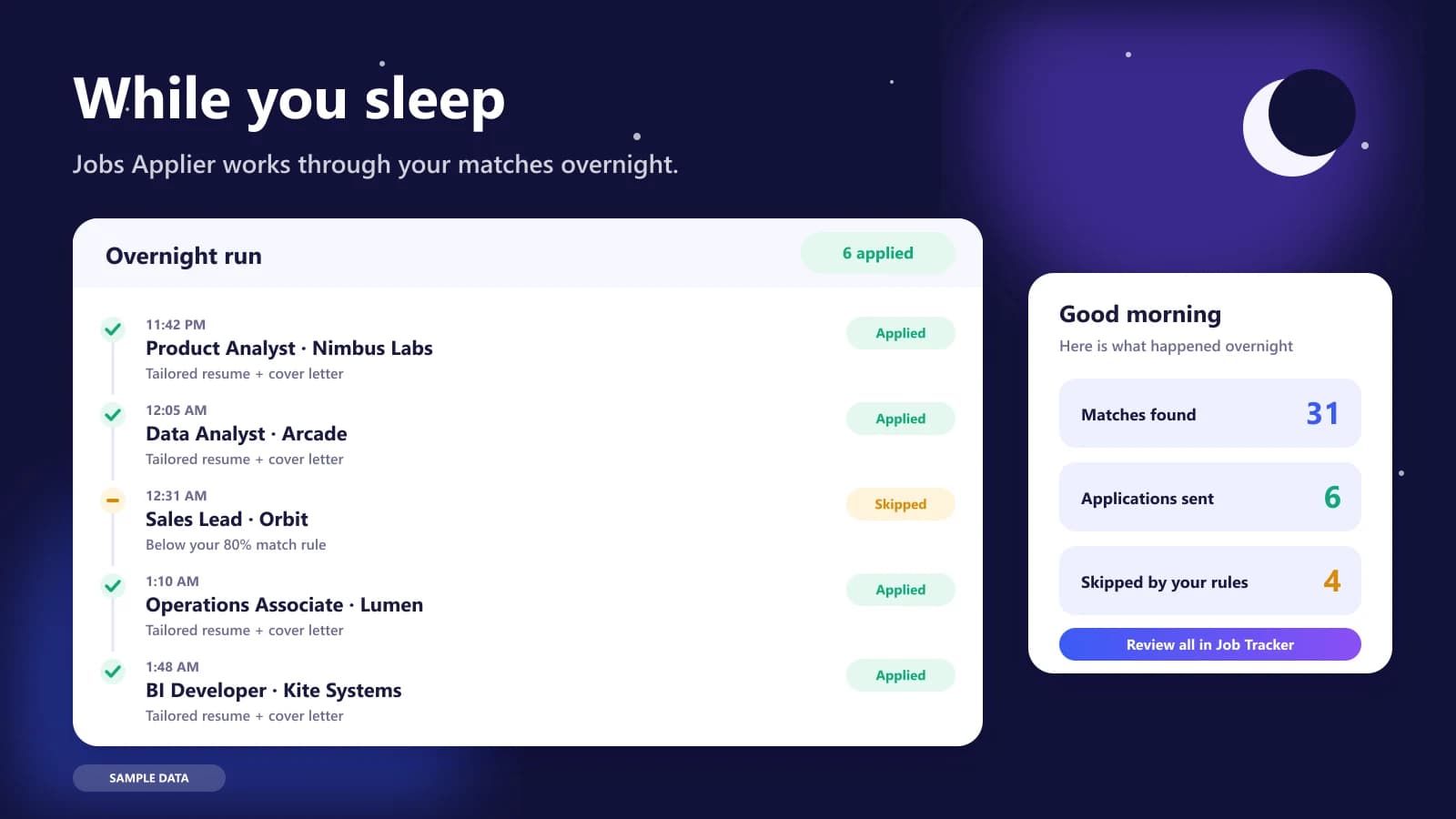
Illustration of the Jobs Applier overnight run: a timeline of tailored applications sent and a morning summary
Illustration with sample data: an overnight run, with a morning summary of what was sent and what was skipped.

A realistic week: building with Teal, searching with Mira Scout

Picture someone targeting product analyst roles. On Sunday they build one strong master resume and check it. From Monday to Friday, a workspace tool helps them tailor that resume to the handful of jobs they care about most, and keeps notes on each company.

The slow part is everything around those few jobs: scanning boards each morning, deciding which postings are worth an hour, and filling in forms. That is the stretch Mira Scout is designed to shrink. The agent shortlists roles overnight, the applier handles the lower-priority matches inside the daily limit, and the person keeps their best energy for the dream roles and the interviews that follow.

Three job seekers, three different choices

Maya, a final-year student, has few roles to apply to and wants every application to be thoughtful. She builds one resume, tailors it to each posting and keeps notes on recruiters. A workspace tool is plenty for her, and automation would add little.

Rohan, a working analyst, is searching quietly while employed and has two free evenings a week. He needs shortlists and routine applications handled for him, then a few hand-tailored ones for his top choices. This is the profile Mira Scout is designed for.

Elena, a career changer, is unsure which titles fit her background. She uses a match score to learn which keywords matter, then adjusts her resume before she applies anywhere. She benefits from both a scanner-style match report and, later, an agent that widens the search once her resume is in shape.

Questions to ask before choosing a job search platform

  • Do I need help building the document, finding roles, or both?
  • Will I tailor each application by hand, or do I want tailoring done within rules?
  • Does the tool keep my notes, contacts and application status together?
  • Can I export or move my data if I change tools later?

Limits to keep in mind about workspace tools

A workspace can only organise what you bring to it. If your resume is vague, a match score will keep telling you the same thing. If you do not open the board, cards go stale. And a tool that keeps everything tidy does not replace sending enough relevant applications. Treat any workspace as support for your effort, not a substitute for it, and check Teal's own site for the current feature list before you decide.

Which should you use?

  • Pick a workspace like Teal if you want to hand-craft each application, keep detailed notes on every company and prefer to press submit yourself.
  • Pick Mira Scout (once it launches) if searching and form-filling eat most of your week and you want an agent to shortlist and apply within strict limits.
  • Use both ideas together by letting the agent handle lower-priority matches while you hand-tailor the few dream roles.

The bottom line

Teal and Mira Scout answer different questions. Teal asks, "how do I organise and polish my search?" Mira Scout asks, "how do I take the repetitive work out of it?" If your resume is weak, fix that first with any builder you like. If your resume is solid and you are drowning in postings, an agent that shortlists and applies within strict limits is the next lever. Neither replaces your judgement about which companies you actually want to work for, and neither can promise interviews. Pick the one that removes your biggest daily friction, and revisit the choice after a few weeks of real results.

Whichever way you lean on Teal, the groundwork is the same:

  1. Finish one master resume. Every matcher, agent and tracker works better from a clean, honest document.
  2. Run an ATS check. Use the free ATS checker to catch formatting and keyword gaps.
  3. Write down your rules. Roles, locations, salary floor, companies to avoid and a daily number you are comfortable with.
  4. Check your plan. Mira Scout is for Pro and Elite members, so compare options on the pricing page. The Mira Scout section is already visible in the V2 dashboard, with a launch countdown.

One last tip: whichever tools you choose, review the results weekly. Count applications sent, replies received and interviews booked, then adjust your resume, your rules or your targets based on what the numbers show. Small, regular adjustments usually beat one big change made in a panic.

Keep reading in the Mira Scout series. Start with Mira Scout: the complete guide, then compare it with other kinds of tools:

Frequently asked questions

Is Mira Scout a Teal alternative?

They overlap but are not identical. Teal is a workspace for building resumes and tracking jobs by hand. Mira Scout adds an agent that searches for roles and can apply within your rules. Mira Resume also has a resume editor and Job Tracker, so you can use it as a workspace too.

Does Teal apply to jobs for you?

Based on its public descriptions and third-party reviews, Teal is a tracker and resume tool where you submit applications yourself. Check Teal's own website for current features, since products change. Mira Scout is designed to offer optional auto-apply within rules you control.

Which has the better resume builder?

That depends on your taste, so try both editors. Mira Resume offers ATS-friendly templates, an AI bullet enhancer and an ATS checker. Judge any builder by whether the finished resume is clean, honest and easy for an applicant tracking system to read.

Can I use Teal and Mira Resume together?

Yes. Nothing stops you from using one tool to organise your search and another to build or check your resume. If you do, keep one master version of your resume so the details stay consistent across applications.

When is Mira Scout available?

It is coming soon to Pro and Elite members, and the V2 dashboard shows a launch countdown. Features may change before launch. Free users can preview the section and upgrade whenever they like.

Found this useful? Share it

Send it to a friend who is job hunting, or save it for later.

Read this guide with AI

Get a plain-language summary and help applying it to your own resume. Pick an assistant; it opens with this article and a ready prompt.

Back to AI Resume Tools hub

All articles