Coming soon
AI Resume Tools

Mira Scout vs Simplify: Which One Fits Your Job Search?

Mira Scout vs Simplify explained: Simplify autofills applications in your browser and you click submit. Mira Scout finds jobs and applies within your rules.

Mira Resume Editorial Team · Career content team Published Updated 7 min read
Mira Scout vs Simplify: cover image for the Mira Resume guide, with an example resume and the 0 main points

Mira Scout vs Simplify is a question about what you want software to do for you. Simplify is well known as a browser extension that autofills job application forms and tracks what you submit, leaving the final click to you. Mira Scout, coming soon to Mira Resume Pro and Elite, adds an agent that searches for roles and can apply within your limits.

Autofill and auto-apply sound similar but behave very differently. The gap between them is who decides, and when. This guide compares them side by side, explains where each fits, and covers the trade-offs honestly. Mira Resume is not affiliated with Simplify. The Mira Scout screens shown below are illustrations with sample data, because the feature has not launched yet. Mira Scout was previously called AI Career Ops; only the name has changed, and the plans and rules described here are the same.
The short answer

Simplify speeds up the part of applying that everyone hates: typing the same details into form after form. You open a job, the extension fills the fields, you review and press submit. Mira Scout is built for the earlier step of finding roles, and optionally for the applying itself within rules you set.

One sits next to you in the browser while you work through jobs. The other is designed to work in the background and report back.

What Simplify is

Simplify describes its Copilot as a browser extension that autofills applications on a long list of job boards and employer application systems, and saves applications to a dashboard so you can track them. Its own pages and reviews say the autofill and tracking are free, with a paid tier that adds more AI resume tailoring and a separate automated option. Third-party reviews generally note that the standard Copilot does not submit for you: you review the form and click submit yourself.

Features and plans change often, so check Simplify's own site for what is included today.

What Simplify does well

Autofill earns its popularity because forms are tedious. Simplify-style tools are good at:

  • Removing repetitive typing. Name, contact, work history and common questions are filled for you.
  • Keeping a human in the loop. You check each form before it is sent, which catches mistakes.
  • Working across many employer portals. One extension covers many application systems.
  • Auto-saving what you applied to. Applications you submit through it land in a dashboard.

The trade-off is that you still go and find every job and click through every application yourself.

Where Mira Scout is different

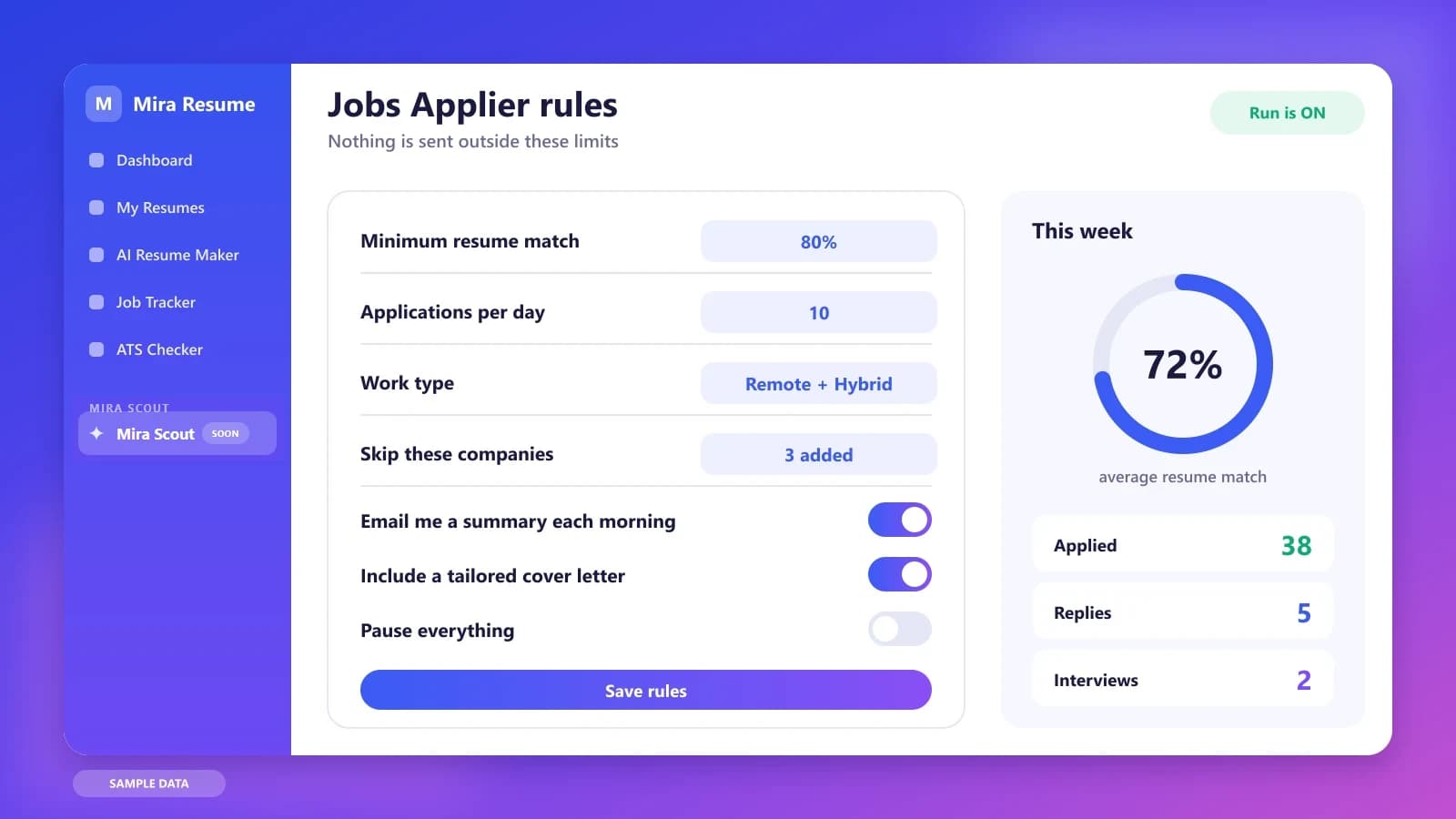
Mira Scout takes over more of the chain. The AI Job Search Agent and Job Finder finds and ranks roles for you, so you are not hunting through boards. The Jobs Applier can apply to the roles that clear your minimum match, within a daily limit, with a tailored resume and cover letter, then logs the result in your Job Tracker.

You choose how much control to keep. Start strict: low daily limit, high match threshold, review the results every morning, and loosen only if the applications look right. If you prefer to click submit yourself, autofill-style tools stay a good choice, and you can still use Mira Scout just for the shortlist.

Illustration of the Jobs Applier rules screen: minimum match, daily limit, work type, pause switch and weekly stats
Illustration with sample data: the rules that decide what the applier is allowed to do.

Mira Scout vs Simplify: side-by-side comparison

This table describes what each tool is designed for. Simplify details come from its own published pages and third-party reviews, and may have changed, so check its website directly. Mira Scout details describe our plan and may change before launch.

QuestionSimplifyMira Scout (coming soon)
Main jobAutofill application forms in your browserFind jobs and apply within rules
Where it runsA browser extension, while you browseAn agent working in the background
Who finds the jobsYouThe agent searches job boards
Who submitsYou review and click submitOptional auto-apply with limits and a pause switch
Resume tailoringDepends on plan and featuresTailored per application
TrackingApplications saved to a dashboardApplications logged in the Mira Job Tracker
AvailabilityAvailable nowPro and Elite members, launching soon

Autofill versus auto-apply: why the difference matters

With autofill, a person approves every submission. With auto-apply, software submits within rules. That one difference changes your risk and your workload. Autofill keeps quality high because you read each form. Auto-apply saves far more time, but it only works well if your rules, your resume and your answers are good, because mistakes can repeat at scale.

Some employers and job boards restrict automated applications, and some application questions need a thoughtful, personal answer. A responsible setup uses a high match threshold, a low daily cap, honest answers and a regular review, and applies by hand wherever automation is not welcome. Read how employers screen in our guide to AI resume screening to see why quality beats volume.

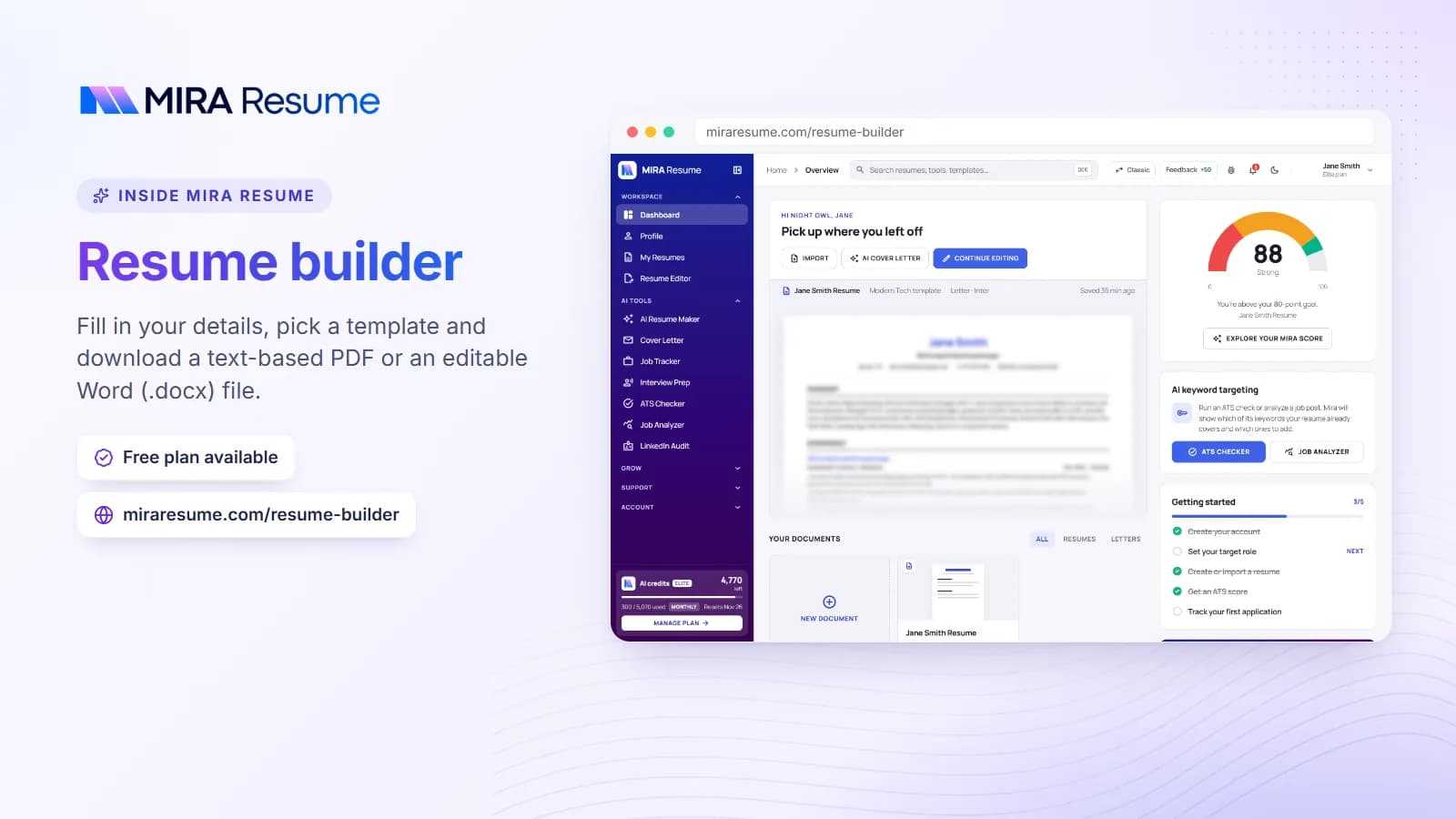
Screenshot of the Mira Resume resume builder (Fill in your details, pick a template and download a text-based PDF or an editable Word (.docx) file.)
Screenshot: Resume builder: Fill in your details, pick a template and download a text-based PDF or an editable Word (.docx) file.Try it
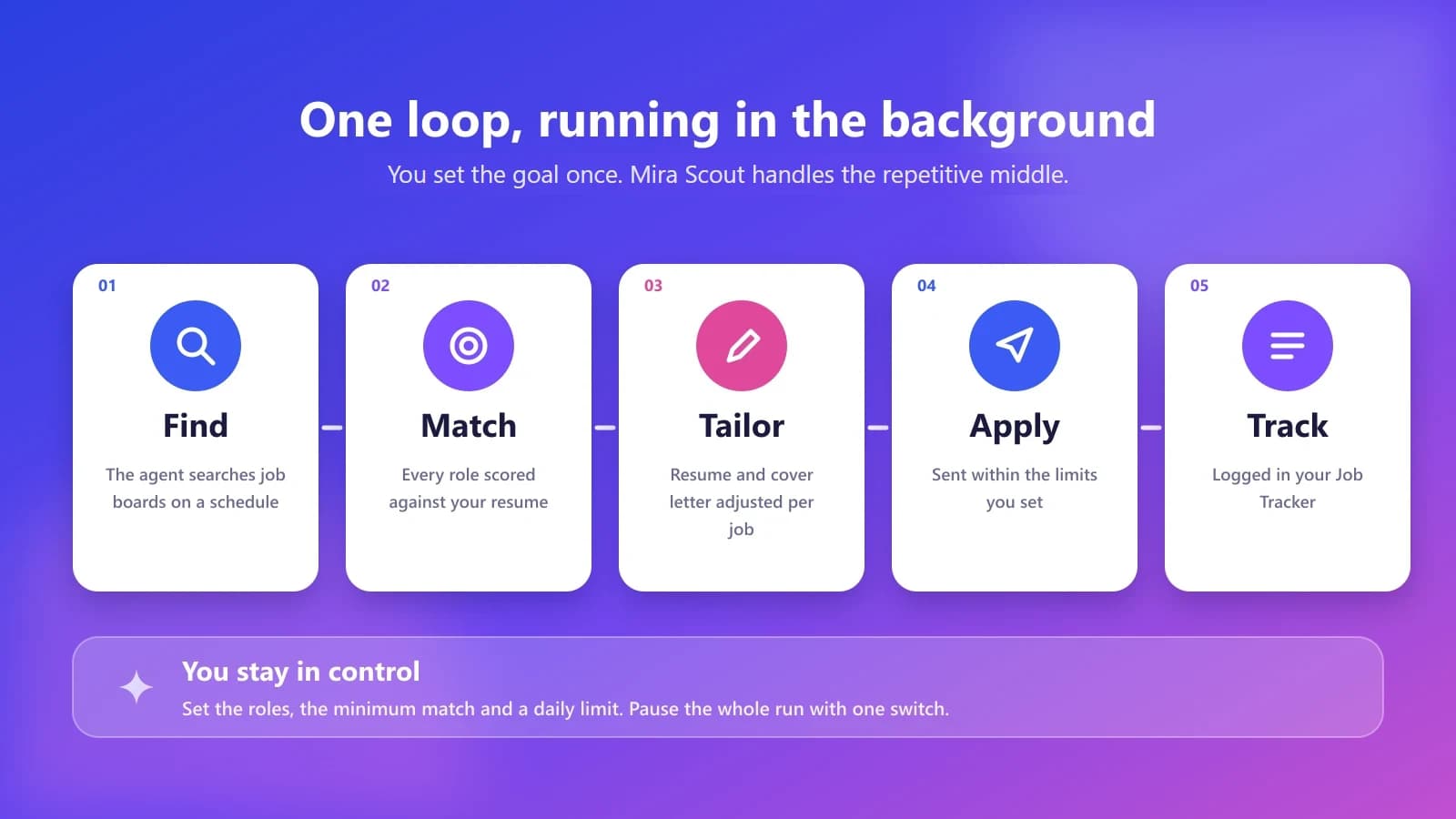
The Mira Scout loop in five steps: find, match, tailor, apply and track
Illustration: the Mira Scout loop. You set the goal once, and the repetitive middle runs in the background.

A realistic week: autofill by day, agent by night

A candidate using autofill spends their evenings opening postings they found, letting the extension fill the fields, reading each form and pressing submit. It is far faster than typing, but it is still a nightly shift.

Add Mira Scout and the shape changes. Overnight, the agent finds roles above the match threshold and, within the daily limit, applies to the routine ones. In the evening the candidate reads the summary, then uses their own time for the applications that need real care: a stretch role, a referral, an unusual form. Automation covers the routine; the human covers the judgement.

Three job seekers, three different choices

Sofia, a software engineer, applies to a few dozen roles through many different employer portals. Autofill saves her the pain of retyping her work history each time, and she likes reading every form before she submits.

Daniel, a nurse working night shifts, has little time between sleeping and shifts. He wants roles found and routine applications sent within strict limits, with a summary he can read over breakfast.

Lena, a marketing manager, wants both control and speed. She lets an agent shortlist and handle low-stakes applications, then applies by hand to five target companies where a personal note and a referral matter more than speed.

Questions to ask about any autofill or auto-apply tool

  • Does it submit for me, or only fill the form for review?
  • How does it handle open-ended questions that need a personal answer?
  • Which employer systems and job boards does it support, and do they allow automation?
  • Can I see and correct every answer it gave?

Limits to keep in mind about autofill

Autofill helps with form-filling but not with deciding which jobs to pursue or with writing a strong, tailored resume. Answers it fills in come from your saved profile, so an out-of-date profile creates out-of-date answers. Read every form, and check Simplify's own site for what its free and paid options include today.

Which should you use?

  • Pick autofill like Simplify if you want to stay hands-on, review every form and apply to roles you chose yourself.
  • Pick Mira Scout (after launch) if you want shortlists delivered and optional applying within strict rules.
  • Mix them: let the agent shortlist roles, then apply by hand to the few that matter most.

The bottom line

Autofill keeps you in control of every submission, which is a real advantage when answers matter. Auto-apply gives you hours back, which is a real advantage when volume matters. The right balance depends on the role: apply by hand where a referral, a personal note or an unusual question is involved, and let rules-based automation handle routine, well-matched postings. Whatever you choose, keep your profile and resume up to date, because both approaches reuse that information over and over. A single outdated detail repeated across many forms is the most common avoidable mistake.

Whichever way you lean on Simplify, the groundwork is the same:

  1. Finish one master resume. Every matcher, agent and tracker works better from a clean, honest document.
  2. Run an ATS check. Use the free ATS checker to catch formatting and keyword gaps.
  3. Write down your rules. Roles, locations, salary floor, companies to avoid and a daily number you are comfortable with.
  4. Check your plan. Mira Scout is for Pro and Elite members, so compare options on the pricing page. The Mira Scout section is already visible in the V2 dashboard, with a launch countdown.

One last tip: whichever tools you choose, review the results weekly. Count applications sent, replies received and interviews booked, then adjust your resume, your rules or your targets based on what the numbers show. Small, regular adjustments usually beat one big change made in a panic.

Keep reading in the Mira Scout series. Start with Mira Scout: the complete guide, then compare it with other kinds of tools:

Frequently asked questions

Is Mira Scout the same as Simplify?

No. Simplify is generally described as a browser extension that autofills application forms while you click submit. Mira Scout is designed to search for roles and, if you enable it, apply within your rules. They solve neighbouring problems and can be used together.

Does Simplify auto-apply?

Its standard autofill extension is described as filling forms for you to review and submit. Simplify's own site describes other paid options, so check its current features directly. Mira Scout is a separate Mira Resume feature with its own rules and limits.

Is autofill safer than auto-apply?

Autofill keeps a human review on every submission, which lowers the chance of a repeated mistake. Auto-apply can be used safely with strict limits, honest answers and regular review, but it needs more care. Always follow each job board's rules.

Can Mira Scout fill in long application questions?

The plan is for tailored resumes and cover letters per role, but personal questions deserve your own review. Treat any generated answer as a draft, correct anything inaccurate, and apply by hand when a form needs a thoughtful response.

What do I need before Mira Scout launches?

A finished master resume, a clean ATS check and a written list of your rules: roles, locations, salary floor and companies to avoid. Mira Scout is for Pro and Elite members, and the dashboard shows the launch countdown.

Found this useful? Share it

Send it to a friend who is job hunting, or save it for later.

Read this guide with AI

Get a plain-language summary and help applying it to your own resume. Pick an assistant; it opens with this article and a ready prompt.

Back to AI Resume Tools hub

All articles