Coming soon
AI Resume Tools

Mira Scout vs Huntr: Which One Fits Your Job Search?

Mira Scout vs Huntr explained: Huntr is a Kanban job tracker with a Chrome extension and AI resume tools. Mira Scout finds jobs and can apply for you.

Mira Resume Editorial Team · Career content team Published Updated 7 min read
Mira Scout vs Huntr: cover image for the Mira Resume guide, with an example resume and the 0 main points

Mira Scout vs Huntr is a question about what you want software to do for you. Huntr is best known as a Kanban-style job application tracker with a Chrome extension and AI resume tools. Mira Scout, coming soon to Mira Resume Pro and Elite, goes further upstream: it finds matching roles and can apply to them within your rules.

A tracker and an agent sit at opposite ends of the search. One records what happened, the other helps decide what happens next. This guide compares them side by side, explains where each fits, and covers the trade-offs honestly. Mira Resume is not affiliated with Huntr. The Mira Scout screens shown below are illustrations with sample data, because the feature has not launched yet. Mira Scout was previously called AI Career Ops; only the name has changed, and the plans and rules described here are the same.
The short answer

Huntr organises a job search you are already running. Cards move across columns as you save, apply, interview and hear back. Mira Scout tries to start earlier: it looks for roles, ranks them against your resume and can apply to the good ones, then records the result for you.

If your problem is chaos, a tracker helps. If your problem is the time it takes to find and apply to roles, an agent helps. They are different tools for different bottlenecks.

What Huntr is

Huntr describes itself as a job search platform built around a Kanban board. Third-party reviews and its own pages describe columns for stages of an application, a Chrome extension that saves a job posting into a card, and AI features for tailoring a resume, writing a cover letter and scoring a match. Some pages also mention filling in application forms with a click from the extension.

The core idea is visibility. Drag a card from Applied to Interview and you see at a glance where your search stands, which companies you need to follow up with and where deadlines fall.

What Huntr does well

A tracker is the unglamorous tool that saves searches from falling apart. Huntr-style boards are good at:

  • Showing your whole pipeline. Saved, applied, interviewing and offers sit in one view.
  • Remembering the details. Notes, contacts, salary info and links live on the card, not in your head.
  • Making follow-ups easy. You can see how long it has been since you applied, then nudge at the right time. Our guide on following up on a job application covers timing and wording.
  • Saving jobs fast. A one-click extension beats copying and pasting links.

Plan limits and pricing change, so check Huntr's own pricing page for what the free and paid tiers include today.

Where Mira Scout is different

Mira Scout covers the front of the funnel. The AI Job Search Agent and Job Finder looks for roles on a schedule and scores each against your resume. The Jobs Applier can apply to roles that meet your minimum match, up to a daily limit, using a tailored resume and cover letter.

Mira Resume already includes a Job Tracker, so the tracking side is covered too. The practical difference is the direction of travel. A tracker waits for you to feed it jobs. Mira Scout brings jobs to the tracker and logs applications as they happen.

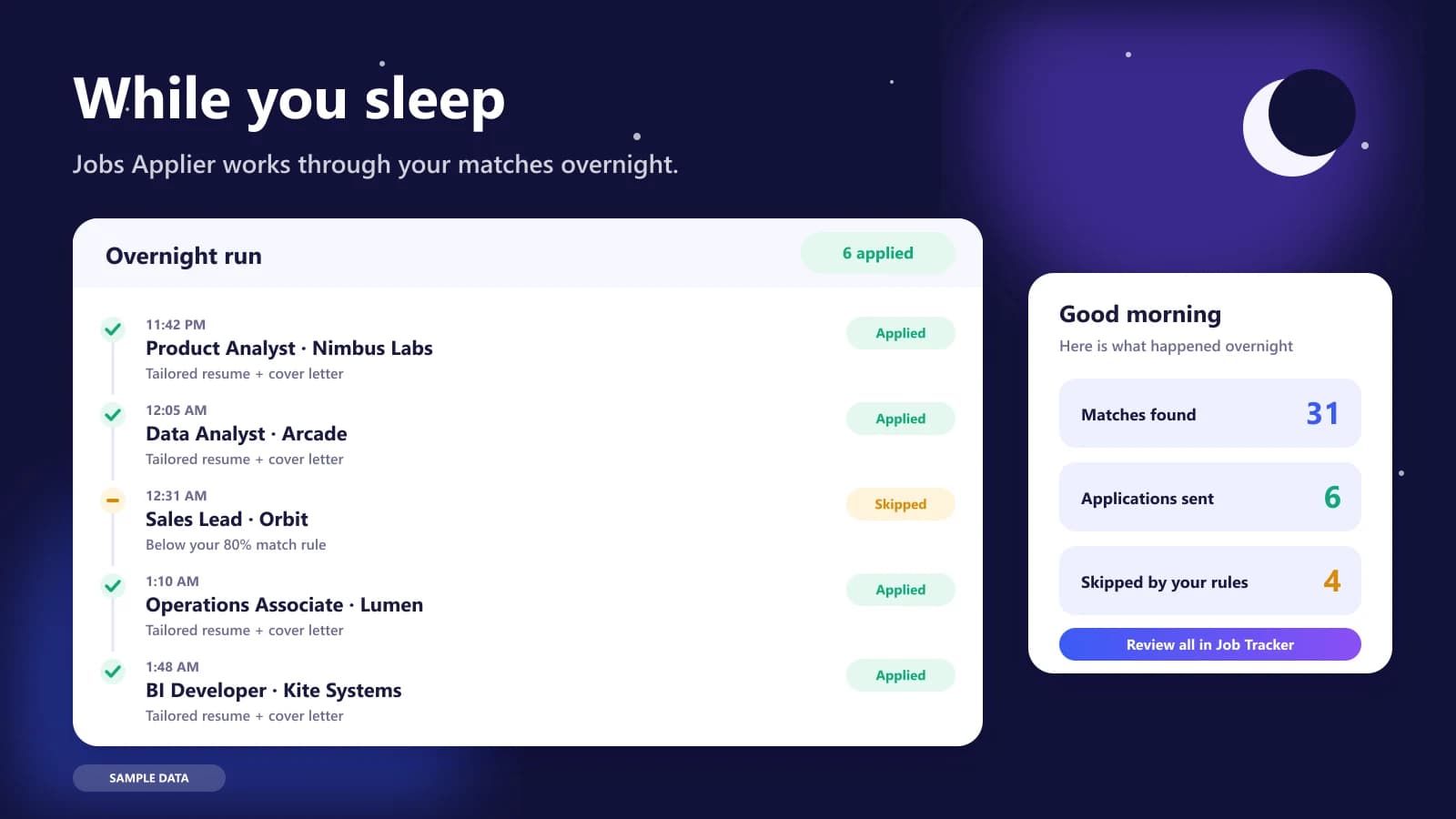
Illustration of the Jobs Applier overnight run: a timeline of tailored applications sent and a morning summary
Illustration with sample data: an overnight run, with a morning summary of what was sent and what was skipped.

Mira Scout vs Huntr: side-by-side comparison

This table describes what each tool is designed for. Huntr details come from its own published pages and third-party reviews, and may have changed, so check its website directly. Mira Scout details describe our plan and may change before launch.

QuestionHuntrMira Scout (coming soon)
Main jobOrganise and track applicationsFind jobs, apply within rules, then track
Starting pointA job you found and savedYour resume and preferences
Board viewKanban columns and cardsMira Job Tracker with applications logged
Job discoveryYou find postings, extension saves themAgent searches job boards on a schedule
ApplyingYou apply, with optional form helpOptional auto-apply with limits and a pause switch
Resume helpAI tailoring and scoringTailored per application, editable in Mira's editor
AvailabilityAvailable nowPro and Elite members, launching soon

Why tracking still matters when an agent applies

Automation does not remove the need to track; it raises it. If an agent sends ten applications a day, you need an accurate log of what went where, which version of your resume was used and when to follow up. Without that, you will not know who to reply to when a recruiter calls.

That is why Mira Scout writes every application to the Job Tracker. Whatever tool you use, keep a single source of truth for status, dates and contacts, and review it weekly. Searches rarely fail for lack of applications alone; they stall when good leads go cold because nobody followed up.

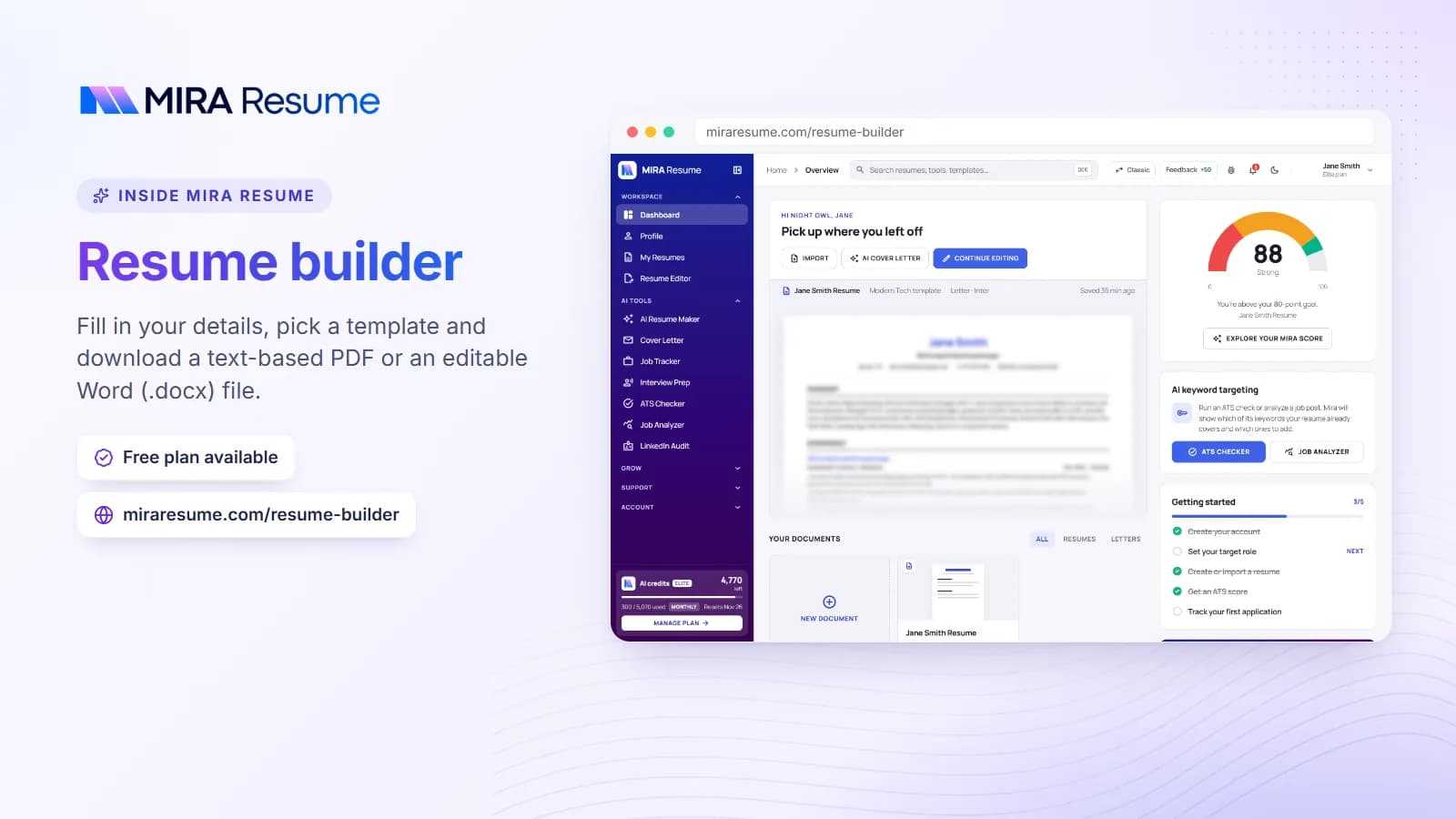
Screenshot of the Mira Resume resume builder (Fill in your details, pick a template and download a text-based PDF or an editable Word (.docx) file.)
Screenshot: Resume builder: Fill in your details, pick a template and download a text-based PDF or an editable Word (.docx) file.Try it
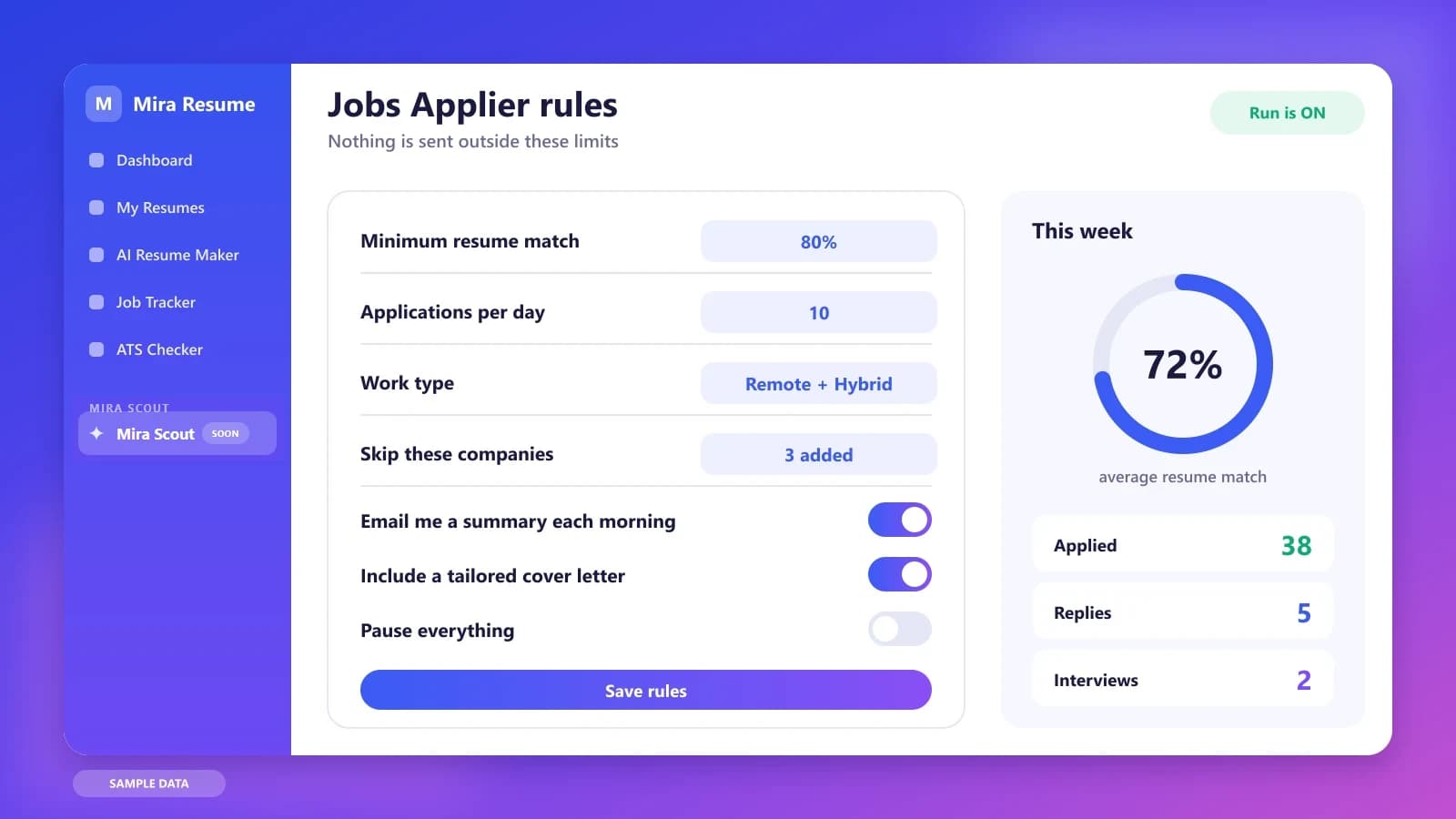
Illustration of the Jobs Applier rules screen: minimum match, daily limit, work type, pause switch and weekly stats
Illustration with sample data: the rules that decide what the applier is allowed to do.

A realistic week: a Kanban board versus an overnight agent

With a tracker, a typical Monday starts by checking which cards need follow-up, then browsing boards for new roles to save. By Wednesday the Saved column is full, and the rest of the week goes on applying and updating cards.

With Mira Scout, Monday starts with a summary instead: new matches, applications sent overnight and roles skipped by your rules. The tracker is already up to date because the agent logged each action. Your time moves from data entry and searching to decisions: which leads to chase, which recruiter to reply to first and which interview to prepare for.

Three job seekers, three different choices

Ahmed, a project manager, is applying to about five companies a week and loves seeing his pipeline laid out in columns. A Kanban tracker suits his personality, and he enjoys the ritual of moving cards.

Priya, a recent graduate, finds the sheer number of boards overwhelming. She does not need a prettier board; she needs help finding roles that actually fit. A job finder that ranks postings against her resume solves her real problem.

Marcus, a sales lead, runs a long, multi-stage search with many contacts. He wants a tracker for relationships and notes, plus automation for the routine applications. He uses both ideas: a board for people, an agent for volume.

Questions to ask before choosing a tracker or an agent

  • Is my problem organisation, or finding and applying to enough roles?
  • How much of the data entry do I want software to do for me?
  • Will I actually open the board every day, or do I need prompts and summaries?
  • Can the tracker connect to my resumes and cover letters, so I know which version went where?

Limits to keep in mind about trackers

A tracker is only as useful as the data in it. If you forget to update a card, the board lies to you. Trackers also do not tell you whether a job is worth applying to; that judgement still falls to you. Check Huntr's own website for current limits on free and paid plans, since boards, AI credits and tracked-job caps can change.

Which should you use?

  • Pick a tracker like Huntr if you already find plenty of roles and mainly need structure, notes and reminders.
  • Pick Mira Scout (after launch) if finding and applying to roles is the slow part, and you want shortlists and optional auto-apply inside firm limits.
  • Combine them by tracking everything in one place, whichever way a job entered your pipeline.

The bottom line

A tracker and an agent are not rivals so much as layers. The tracker is the memory of your search, and the agent is the legwork. If you only have time for one habit, make it keeping your pipeline accurate, because lost follow-ups cost more offers than a slow application pace. If you can add a second layer, let an agent bring you well-matched roles and log them automatically. Start small, check the first week's results by hand, and keep your own notes on the relationships that matter, because no software knows a recruiter the way you do.

Whichever way you lean on Huntr, the groundwork is the same:

  1. Finish one master resume. Every matcher, agent and tracker works better from a clean, honest document.
  2. Run an ATS check. Use the free ATS checker to catch formatting and keyword gaps.
  3. Write down your rules. Roles, locations, salary floor, companies to avoid and a daily number you are comfortable with.
  4. Check your plan. Mira Scout is for Pro and Elite members, so compare options on the pricing page. The Mira Scout section is already visible in the V2 dashboard, with a launch countdown.

One last tip: whichever tools you choose, review the results weekly. Count applications sent, replies received and interviews booked, then adjust your resume, your rules or your targets based on what the numbers show. Small, regular adjustments usually beat one big change made in a panic.

Keep reading in the Mira Scout series. Start with Mira Scout: the complete guide, then compare it with other kinds of tools:

Frequently asked questions

Is Mira Scout a Huntr alternative?

Partly. Mira Resume has its own Job Tracker, so it can act as a tracker. Mira Scout adds an agent that finds roles and can apply within your rules, which a pure Kanban tracker does not aim to do. Choose based on whether your bottleneck is organising or finding.

Does Huntr auto-apply to jobs?

Huntr is generally described as a tracker with a Chrome extension and AI resume tools, with some form-filling help. Check Huntr's own site for current features. Mira Scout is designed to offer optional auto-apply within rules, a daily limit and a pause switch.

Can I move my jobs from a tracker into Mira Resume?

You can add jobs to the Mira Job Tracker by hand today. If you have a long list elsewhere, start by recording the active applications that still need follow-up, and let older closed items go.

Which is better for staying organised?

Both organise applications. A dedicated Kanban tracker may suit you if you love board views and notes. Mira's tracker is built to sit next to your resumes, cover letters and Mira Scout results, so everything about a job lives in one account.

Do I need Mira Scout if I only apply to a few jobs?

Probably not. If you target a small number of roles, hand-tailored applications and a tracker may serve you best. Mira Scout is aimed at people who need to search and apply at a steadier pace without spending every evening on forms.

Found this useful? Share it

Send it to a friend who is job hunting, or save it for later.

Read this guide with AI

Get a plain-language summary and help applying it to your own resume. Pick an assistant; it opens with this article and a ready prompt.

Back to AI Resume Tools hub

All articles