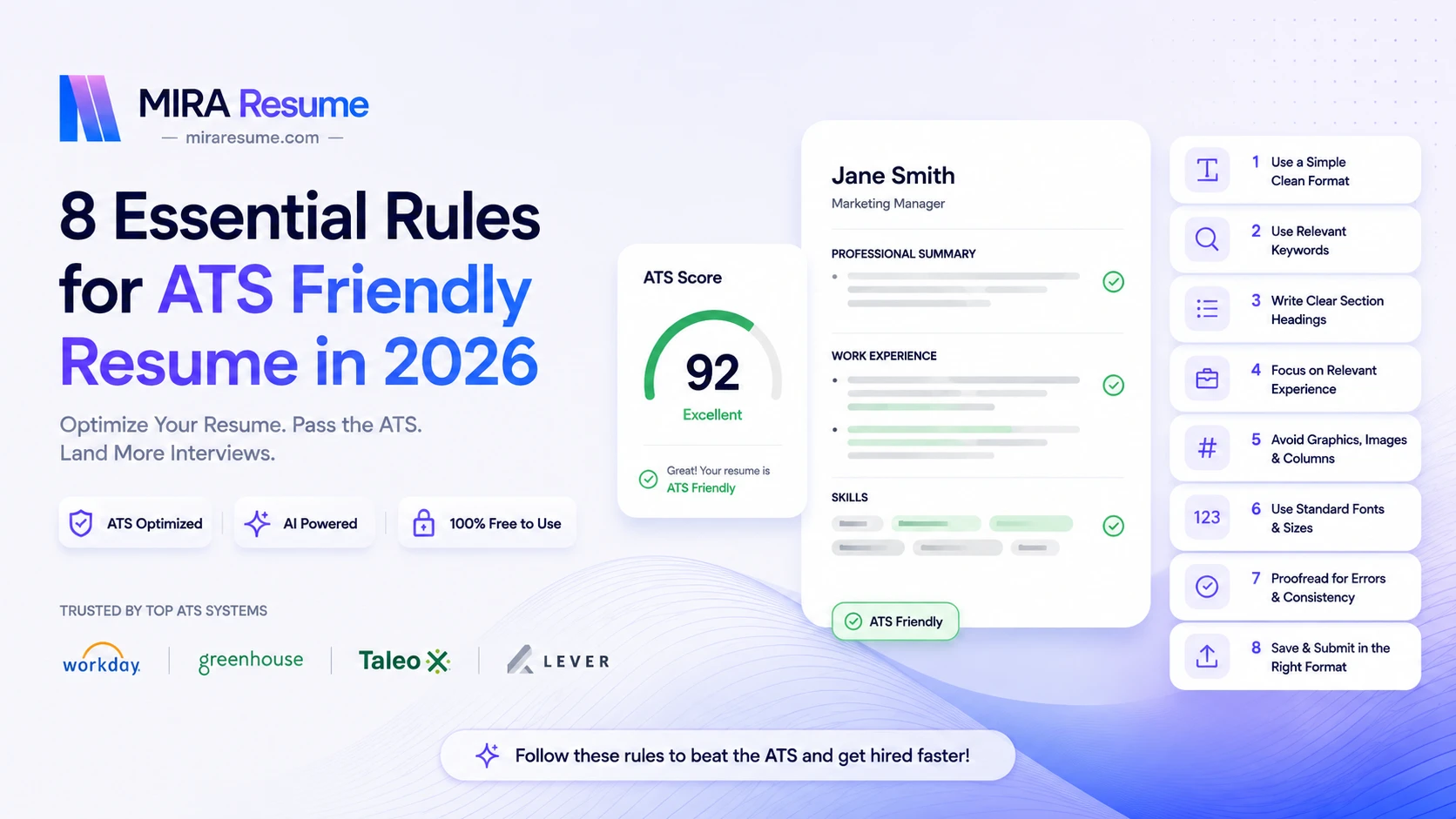
8 Essential Rules for ATS Friendly Resume in 2026
Modern recruitment is increasingly driven by technology. Before a recruiter ever reads your resume, it is often evaluated by software designed to identify the most qualified candidates. If your resume cannot be properly read by an Applicant Tracking System (ATS), your chances of receiving an interview may decrease significantly—even if you're highly qualified.
Whether you're a student, fresh graduate, experienced professional, or career changer, understanding how ATS software works has become essential in 2026.
In this comprehensive guide, you'll learn the 8 essential rules for creating an ATS Friendly Resume, common ATS mistakes to avoid, a practical ATS resume checklist, and expert recommendations to maximize your interview opportunities.
What Is an Applicant Tracking System (ATS)?
An Applicant Tracking System (ATS) is recruitment software that helps employers collect, organize, scan, rank, and filter resumes submitted for job openings.
Instead of manually reviewing thousands of applications, recruiters rely on ATS software to automatically identify candidates whose resumes closely match the job description.
Today, organizations of every size—from startups to multinational corporations—use ATS platforms such as Workday, Greenhouse, Lever, iCIMS, SmartRecruiters, BambooHR, and Taleo.
How ATS Works
Most ATS software performs several important tasks:
Parses resume content into structured information
Identifies skills and qualifications
Matches keywords with job descriptions
Organizes candidate profiles
Helps recruiters search resumes quickly
Ranks applicants based on relevance
An ATS doesn't "hire" people—but it determines which resumes recruiters are most likely to review first.
Build an ATS-Friendly Resume That Recruiters Actually Read
Create professional, single-column resumes engineered to pass recruitment software. Tailored for software engineers, nurses, project managers, and 50+ roles.
Why Companies Use ATS Software in 2026
Recruitment has become more competitive than ever.
Companies often receive hundreds or even thousands of applications for a single position. ATS software helps recruiters:
Save significant hiring time
Improve candidate management
Standardize resume screening
Reduce manual administrative work
Search resumes using specific skills and qualifications
Improve recruitment efficiency
For job seekers, this means creating an ATS Compliant Resume is no longer optional—it's an essential part of the job application process.
Why an ATS Friendly Resume Matters
An ATS Friendly Resume ensures your qualifications are accurately extracted and understood by recruiting software.
A properly optimized resume can:
Improve ATS parsing accuracy
Increase recruiter visibility
Match more job-specific keywords
Reduce formatting issues
Improve interview opportunities
Simply put:
Your resume should be written for both the ATS and the human recruiter.
8 Essential Rules for ATS Friendly Resume in 2026
Test Your Resume Against Top ATS Scanners in 60 Seconds
Scan your resume for Workday, Greenhouse, Taleo & Lever compliance. Get instant keyword recommendations, formatting scores, and AI bullet fixes.
1. Use a Simple and ATS-Friendly Resume Format
One of the biggest reasons resumes fail ATS screening is overly complicated formatting.
Many candidates use elaborate templates with multiple columns, icons, graphics, text boxes, or decorative elements. While these may look visually appealing, ATS software often struggles to interpret them correctly.
Best ATS Resume Format
Use:
Single-column layout
Standard margins
Left-aligned text
Clear spacing
Consistent formatting
Good Example
Professional Summary

Work Experience

Education

Skills

Certifications

Projects
Avoid
Multi-column designs
Tables for layout
Floating text boxes
Sidebars
Infographics
Pro Tip
Simple formatting improves ATS readability and recruiter experience simultaneously.
2. Choose ATS-Compatible Fonts
Font selection plays a surprisingly important role in resume readability.
ATS software reads standard fonts more accurately than decorative or custom fonts.
Recommended Fonts
Calibri
Arial
Helvetica
Cambria
Georgia
Times New Roman
Verdana
Font Size
Section | Recommended Size |
|---|---|
Body | 10–12 pt |
Headings | 12–16 pt |
Name | 18–24 pt |
Avoid
Script fonts
Handwriting fonts
Decorative fonts
Excessively small text
Inconsistent font usage
3. Optimize Resume Keywords from the Job Description
Keywords remain one of the most important factors in ATS Resume 2026 optimization.
ATS software compares your resume with the job posting.
If important skills or qualifications are missing, your resume may appear less relevant.
Example
Job Description
Python
SQL
Data Analysis
Tableau
Power BI
Machine Learning
Good Resume Skills
Python
SQL
Tableau
Power BI
Data Visualization
Machine Learning
Actionable Tips
Carefully read the job description
Match exact terminology where appropriate
Include technical and soft skills naturally
Use industry-standard job titles
Avoid keyword stuffing
Common Mistake
Poor:
"Excellent communication and hardworking."
Better:
"Analyzed sales data using SQL and Power BI, improving reporting efficiency by 35%."
4. Write Measurable Achievements Instead of Job Duties
Recruiters value measurable impact more than generic responsibilities.
Instead of listing what you were expected to do, demonstrate what you accomplished.
Weak Example
Responsible for customer support.
Strong Example
Resolved over 95 customer inquiries daily while maintaining a 98% customer satisfaction rating.
More examples:
Instead of:
Managed projects.
Write:
Led five cross-functional projects valued at $2M, delivering all milestones ahead of schedule.
Instead of:
Increased sales.
Write:
Increased quarterly sales by 28% through strategic account management.
Numbers strengthen both ATS matching and recruiter engagement.
5. Use Standard Resume Section Headings
ATS software recognizes common section titles more accurately.
Recommended Headings
Professional Summary
Work Experience
Education
Skills
Certifications
Projects
Awards
Volunteer Experience
Languages
Avoid Creative Headings
Instead of:
My Journey
Career Story
What I Know
Superpowers
Use:
Experience
Skills
Education
Simple headings improve ATS parsing considerably.
6. Avoid Graphics, Icons, Tables, and Images
Many ATS systems still struggle with visual elements.
Avoid:
Icons
Charts
Skill bars
Logos
Photos
Graphs
Infographics
SmartArt
Complex tables
Why?
ATS software primarily reads text—not design elements.
Better Alternative
Instead of:
⭐⭐⭐⭐☆
Write:
Python — Advanced
Instead of:
Skill progress bars
Write:
Technical Skills
Python
Java
AWS
Docker
Kubernetes
7. Save Your Resume in the Correct File Format
Choosing the wrong file format may prevent ATS software from parsing your resume correctly.
Recommended Formats
Format | ATS Compatibility |
|---|---|
DOCX | Excellent |
PDF (text-based) | Good (if accepted) |
TXT | Basic |
Always Check the Job Posting
If the employer requests:
PDF → Upload PDF
DOCX → Upload DOCX
Avoid
Image PDFs
Scanned resumes
JPEG
PNG
Photoshop files
When in doubt, DOCX remains the safest choice for most ATS platforms.
8. Proofread and Test ATS Compatibility
Even the best resume can fail if it contains spelling errors, inconsistent formatting, or parsing issues.
Before Applying
Review:
Grammar
Spelling
Dates
Contact information
Section order
Bullet formatting
Keyword alignment
Test Your Resume
Use an ATS Resume Checker to verify:
Parsing accuracy
Keyword optimization
Formatting compatibility
Missing sections
Readability score
A few minutes of testing can prevent avoidable mistakes.
Expert Tip: Always tailor your resume for each application rather than sending the same resume to every employer.
ATS Resume Format Comparison
Feature | ATS Friendly | Not ATS Friendly |
|---|---|---|
Single-column layout | ✅ | ❌ |
Standard fonts | ✅ | ❌ |
Keyword optimization | ✅ | ❌ |
Graphics | ❌ | ✅ |
Icons | ❌ | ✅ |
Tables | Limited | Heavy usage |
Standard headings | ✅ | ❌ |
DOCX format | ✅ | Mixed formats |
Measurable achievements | ✅ | Generic duties |
Common ATS Resume Mistakes
Many qualified candidates unintentionally reduce their chances by making avoidable mistakes.
Most Common ATS Resume Errors
Using overly designed resume templates
Stuffing keywords unnaturally
Missing important skills from the job description
Uploading scanned PDFs
Using non-standard section names
Writing long paragraphs
Including irrelevant work experience
Adding graphics and icons
Incorrect file format
Typographical errors
Outdated contact information
Generic resumes sent to every employer
Avoiding these mistakes significantly improves resume performance.
ATS Resume Checklist
Before clicking Submit Application, verify the following:
Formatting
Single-column layout
Standard fonts
Consistent spacing
No graphics
No text boxes
Content
Tailored summary
Relevant keywords
Quantified achievements
Clear skills section
Updated work experience
Technical
Correct file format
Proper section headings
Functional hyperlinks
Correct contact information
No spelling or grammar errors
Final Review
Resume matches job description
ATS parser can read all content
Easy for recruiters to scan in under 10 seconds
Frequently Asked Questions (FAQs)
What is an ATS Friendly Resume?
An ATS Friendly Resume is designed using formatting, keywords, and structure that Applicant Tracking Systems can accurately read and parse. It improves the likelihood that recruiters will see your application.
Can ATS Read PDF Resumes?
Most modern ATS platforms can parse text-based PDFs. However, some employers still recommend DOCX files. Always follow the file format specified in the job posting.
Are Resume Templates ATS Friendly?
Some are, but many visually complex templates use columns, tables, icons, and graphics that can confuse ATS software. Choose templates specifically designed for ATS compatibility.
How Many Keywords Should a Resume Include?
There is no ideal number. Include relevant keywords naturally throughout your summary, work experience, skills, and project sections without forcing repetition.
Do ATS Systems Reject Resumes Automatically?
ATS software generally filters and ranks resumes based on relevance rather than outright rejecting them. Recruiters often review the highest-matching candidates first.
Should Every Job Application Use the Same Resume?
No. Tailor your resume for each role by aligning your experience, skills, and keywords with the specific job description.
Does Resume Design Matter?
Yes, but readability matters more than creativity. A clean, professional layout that both ATS software and recruiters can easily navigate is the best choice.
Can Fresh Graduates Create ATS-Friendly Resumes?
Absolutely. Students and recent graduates can emphasize education, internships, projects, certifications, technical skills, and extracurricular achievements while following ATS best practices.
Best Practices for Resume Optimization in 2026
To stay competitive, combine ATS optimization with strong storytelling:
Tailor every resume to the target role.
Use action verbs such as "Led," "Developed," "Implemented," and "Optimized."
Highlight measurable outcomes wherever possible.
Keep your resume concise—typically one page for early-career professionals and up to two pages for experienced candidates.
Include certifications, relevant projects, and technical skills that align with the job description.
Review your resume regularly to reflect your latest achievements and responsibilities.
Remember, ATS optimization should never come at the expense of readability. A resume that is easy for software to parse and easy for recruiters to skim offers the best chance of success.
Final Thoughts
Creating an ATS Friendly Resume in 2026 is about much more than formatting. It's about presenting your qualifications in a way that both Applicant Tracking Systems and hiring managers can easily understand.
By following these eight essential rules—using a simple layout, choosing ATS-compatible fonts, optimizing keywords, showcasing measurable achievements, using standard section headings, avoiding graphics, selecting the correct file format, and carefully proofreading your resume—you can significantly improve your visibility during the hiring process.
As recruitment technology continues to evolve, candidates who regularly update and tailor their resumes for each application will remain at a competitive advantage.
Investing time in resume optimization today can lead to more interview invitations, stronger recruiter engagement, and better career opportunities tomorrow.
Improve Your Resume Before You Apply
Don't leave your next job application to chance.
Use an ATS Resume Checker to test your resume for formatting issues, keyword optimization, and ATS compatibility before submitting it. A quick review can help identify hidden problems, improve your resume score, and increase your chances of getting shortlisted for interviews.
Ready to stand out? Optimize your resume today and apply with confidence.
Internal Linking Recommendations
Free Resume Builder
Professional Resume Templates
Resume Summary Examples
Resume Skills Guide
Cover Letter Guide
Resume vs CV
LinkedIn Profile Optimization
Resume Keywords Guide
Interview Preparation Tips
External Linking Recommendations
Official documentation or learning resources from major ATS providers (e.g., Workday, Greenhouse, Lever)
O*NET Online for occupation and skills research
U.S. Bureau of Labor Statistics Occupational Outlook Handbook (or equivalent regional labor market resources)
Professional career development resources from recognized universities or government employment agencies
Suggested Image Alt Text
ATS Friendly Resume example in 2026
Applicant Tracking System resume workflow illustration
ATS resume checklist infographic
ATS resume format comparison table
Resume keyword optimization example
Good vs bad ATS resume layout comparison
Recruiter reviewing an ATS compliant resume
Resume optimization process for job seekers